Introduction to Strings in Python Programming
Explore the fascinating world of strings in Python with Professor Henry Kautz. This guide covers fundamental concepts such as reading strings, string data types, operations on strings, and distinctions between strings and lists. Learn how to manipulate strings effectively, including concatenation, indexing, slicing, and utilizing built-in string functions. Discover practical applications like translating, formatting, and analyzing data stored as strings. Perfect for beginners and intermediate programmers, this resource will enhance your programming skills and understanding of string handling in Python.

Introduction to Strings in Python Programming
E N D
Presentation Transcript
Computing with Strings CSC 161: The Art of Programming Prof. Henry Kautz 9/16/2009
Some of My Favorite Things • Things made of strings • Human language • Web pages • Databases • Programs • ... • Things to do with strings • Translate • Compose • Format • Analyze • ...
String Data Type • The <string> data type: • Sequence of characters of any length • In expressions, enclose in single or double quotes: • "Henry A. Kautz" • 'Henry A. Kautz' • Can be assigned to a variable: >>> name = Henry >>> print name Henry • Not the same a number, even if they print the same! >>> x = "99" >>> y = 99 >>> print x == y False
Reading Strings • Reading a string is little bit trickier than reading numbers • Python input() function • Reads a line of text • Evaluates it as a Python expression • Returns the value • This is why typing a number (or any numeric expression) gives a number, not a string >>> x = input("Enter number:") Enter number: 99 >>> print x == 99 True >>> print x == "99" False
Reading Strings • In fact, input() accepts any legal expression: >>> x = input("Enter number:") Enter number: 99 / 3 >>> print x 33 >>> y = 25 >>> x = input("Enter number:") Enter number: y >>> print x 25
Reading Strings • Why does this fail? >>> name = input("Enter first name: ") Enter first name: Henry Traceback (most recent call last): File "<pyshell#5>", line 1, in <module> name=input("Enter first name:") File "<string>", line 1, in <module> NameError: name 'Henry' is not defined >>>
Reading Strings • Clumsy solution: >>> name = input("Enter first name: ") Enter first name: "Henry" >>> • Better solution: • Use raw_input() • Like input(), but does not evaluate: always returns a string >>> name = raw_input("Enter first name: ") Enter first name:Henry >>> type(name) <type 'string'>
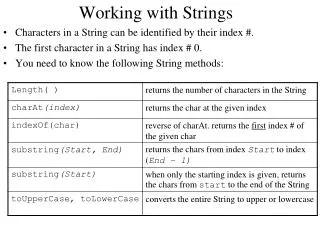
Operations on Strings • Indexing • Just like lists, can use square brackets to pick out characters within a string >>> course = 'Art of Programming' >>> course[0] 'A' • Slices of strings can be addressed >>> course[0:3] 'Art' >>> course[7:] 'Programming' >>> course[7:len(course)] 'Programming'
Operations on Strings • Concatenation >>> city = 'Rochester' >>> state = 'NY' >>> address = city + state >>> address RochesterNY >>> address = city + ' ' + state >>> address Rochester NY >>> zip = 14627 >>> address = city + ' ' + state + ' ' + zip TypeError: cannot concatenate 'str' and 'int' objects >>> address = city + ' ' + state + ' ' + str(zip) >>> address Rochester NY 14627 str() converts almost anyththing to a string
Strings and Lists • Compare string and list: • mystring = "Cat" • mylist = ['C', 'a', 't'] • Can index elements or slices • mystring[0:2] == 'Ca' • mylist[0:2] == ['C', 'a'] • Can concatenate • mystring + 's' == 'Cats' • mylist + ['s'] == ['C', 'a', 't', 's']
Differences Between Strings & Lists • You can change an element of a list: • mylist[0] = 'B' • mylist == ['B', 'a', 't'] • You cannot change a character in a string: • mystring[0] = 'B' • ERROR • Instead, slice and concatenate to create a new string: • 'B' + mystring[1:3] == 'Bat'
String Library • import string • string.split('To be, or not to be, that is the question.') • ['To', 'be,', 'or', 'not', 'to', 'be,', 'that', 'is', 'the', 'question'] • string.split('To be, or not to be, that is the question.', ',') • ['To be', ' or not to be', ' that is the question.'] • string.join(['To', 'be,', 'or', 'not', 'to', 'be,', 'that', 'is', 'the', 'question']) • 'To be, or not to be, that is the question.'
Converting Between Strings & Lists • list('cat') • ['c', 'a', 't'] • str(['c', 'a', 't']) • "['c', 'a', 't']" • string.join(['c', 'a', 't']) • 'c a t' • string.join(['c', 'a', 't'], "") • 'cat'
More Library Functions • Finding the position of one string within another string • string.find('To be or not?', 'be') • 3 • Replacing a string with another string • string.replace('Sigh. I wish. To sleep.', '.', '!') • 'Sigh! I wish! To sleep!' • See the textbook many more string functions
In Class Exercise • With a person sitting next to you, write Python to reverse the string stored in the variable S. • Left side of class: do NOT use lists, only strings. • Right side of class: convert to list, reverse, then convert back to a string.
Course Status • Quiz Wednesday in class • for, if, logical expressions, range, lists • 15 minutes • Assignment 3: RNA Secondary Structure Prediction • Design solution in your workshop this week • Implement & debug in lab Tuesday or Thursday • Turn in by 10:00am Saturday • Read: Zelle, Chapter 4