Create SQL Server Service Broker Endpoint for HTTP/TCP Communication
This guide details the syntax and options for creating a Service Broker endpoint in SQL Server using T-SQL. You can configure the endpoint name, authorization logins, operational state (STARTED, STOPPED, or DISABLED), and the communication protocol (HTTP or TCP). Learn how to specify protocol-specific arguments for both TCP and HTTP, as well as options for authentication methods, encryption, and message forwarding settings. This setup is essential for enabling efficient communication between services in a distributed database environment.


Create SQL Server Service Broker Endpoint for HTTP/TCP Communication
E N D
Presentation Transcript
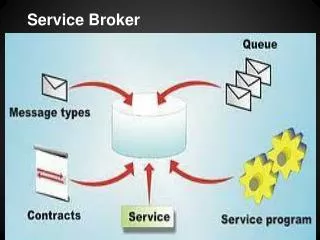
SQL SERVER SERVICE BROKER
CREATE ENDPOINT endPointName [ AUTHORIZATION login ] [ STATE = { STARTED | STOPPED | DISABLED } ] AS { HTTP | TCP } (<protocol_specific_arguments>) FOR { SOAP | TSQL | SERVICE_BROKER | DATABASE_MIRRORING } (<language_specific_arguments>)
<AS TCP_protocol_specific_arguments> ::= AS TCP (LISTENER_PORT = listenerPort [ [ , ] LISTENER_IP = ALL | ( 4-part-ip ) | ( "ip_address_v6" ) ])
FOR SERVICE_BROKER ([ AUTHENTICATION = { WINDOWS [ { NTLM | KERBEROS | NEGOTIATE } ] | CERTIFICATE certificate_name | WINDOWS [ { NTLM | KERBEROS | NEGOTIATE } ] CERTIFICATE certificate_name [ [ , ] ENCRYPTION = { DISABLED | { { SUPPORTED | REQUIRED } [ ALGORITHM { RC4 | AES | AES RC4} ] } ] [ [ , ] MESSAGE_FORWARDING = { ENABLED | DISABLED } ] [ [ , ] MESSAGE_FORWARD_SIZE = forward_size ])
FOR DATABASE_MIRRORING ([ AUTHENTICATION = { WINDOWS [ { NTLM | KERBEROS | NEGOTIATE } ] | CERTIFICATE certificate_name | WINDOWS [ { NTLM | KERBEROS | NEGOTIATE } ] CERTIFICATE certificate_name [ [ [ , ] ] ENCRYPTION = { DISABLED | { { SUPPORTED | REQUIRED } [ ALGORITHM { RC4 | AES | AES RC4} ] } ] [ , ] ROLE = { WITNESS | PARTNER | ALL })