
Uploaded by
manchu
1 SLIDES
147 VUES
10LIKES
Process to Submit and Handle Invalid IMEI Numbers for Customer Details
DESCRIPTION
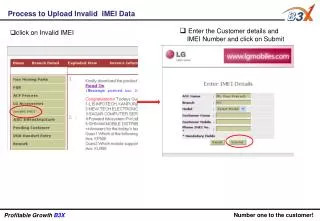
This guide outlines the necessary steps to upload and address invalid IMEI data efficiently. Users should enter customer details, including the IMEI number, and then click on the submit button. If the IMEI is flagged as invalid, the system will guide users to click on the relevant invalid IMEI option to inform the customer accordingly. By following the procedure, businesses can ensure smooth operations and enhance profitability while maintaining accurate records.
Download
1 / 1
Download Presentation

Télécharger la présentation
Process to Submit and Handle Invalid IMEI Numbers for Customer Details
An Image/Link below is provided (as is) to download presentation
Download Policy: Content on the Website is provided to you AS IS for your information and personal use and may not be sold / licensed / shared on other websites without getting consent from its author.
Content is provided to you AS IS for your information and personal use only.
Download presentation by click this link.
While downloading, if for some reason you are not able to download a presentation, the publisher may have deleted the file from their server.
During download, if you can't get a presentation, the file might be deleted by the publisher.
E N D
Presentation Transcript
Process to Upload Invalid IMEI Data • Enter the Customer details and • IMEI Number and click on Submit • click on Invalid IMEI Number one to the customer! Profitable Growth B3X



















More Related

Audio
Live Player