Hacking Your HTC Phone: Dual Booting Windows Mobile and Android
Explore the evolution of smartphones and PDAs, focusing on how to customize your HTC device. Learn the basics of dual booting Windows Mobile and Android, the challenges of hacking, and the limitations of memory and boot ROM accessibility. This guide provides step-by-step instructions for flashing custom ROMs, including setting up a bootloader. Understand whether your HTC device can run Android and discover the capabilities of modern phones that surpass early computing devices. Remember to back up your data and embrace the risks involved!

Hacking Your HTC Phone: Dual Booting Windows Mobile and Android
E N D
Presentation Transcript
Custom images and dual booting Windows Mobile and Android Hacking Your HTC Phone
Evolution of Phones/PDA’s • Initially phones and PDA’s were separate devices. • Integration of PDA into phone started as glorified contact organizers. • RIM Black Berry led strong efforts towards modern phones/PDA’s. Trenton Computer Festival 2010
Modern Phone Capabilities • Observed that HTC Herald is faster in speed, boot time, and capabilities compared to 486DX2 circa 1994 (personal comparison). • Newer generation phones far exceed even early generation Pentium class CPU’s. • Internet and/or data services are common inclusions in mobile packages. Trenton Computer Festival 2010
What is a phone? • According to Von Neumann design model a computer has three main components: • CPU • Memory • Input/Output • Storage • It’s really just a very small computer. Trenton Computer Festival 2010
Can it be hacked? • If it’s just a computer…. • Why can’t they experience same hacking that GNU/Linux enthusiasts did with PC’s? Trenton Computer Festival 2010
Challenges • No option to boot off CD or alternate media. • Requires more intimate/creative access to boot ROM. • Limited RAM/ROM. Trenton Computer Festival 2010
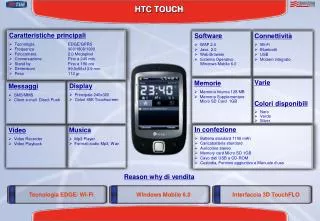
Model Phone for Presentation • Sold by T-Mobile as the “Wing.” • Branded elsewhere as HTC Herald. • Components: • 201 MHz TI OMAP 850 Processor. • 64 MB RAM (44 MB accessible) • 128 MB ROM • Display: TFT 240 x 320 Touchscreen • Networks: GSM850, GSM900, GSM1800, GSM1900 • Cell Links: CSD, GPRS, EDGE Trenton Computer Festival 2010
Disclaimer • FOLLOW INSTRUCTIONS. • Have backup of data. • Acknowledge risks. • Don’t Brick your phone. Trenton Computer Festival 2010
Custom Images • Vendor/Service provider sells phone with custom image/ROM. • Many alterative ROMs available. • Might require addition efforts to enable basic features such as SMS. Trenton Computer Festival 2010
How to Flash a ROM Instructions • Download Flash Center • Unzip Flash Center in a location of your choice, let's say your Desktop • Download the ROM you want to use • Unzip or unrar the downloaded .NBH file into the RUU folder inside the Flash Center folder • Make sure that you have the .NBH file in the RUU folder and not within another folder • Put your phone into flight mode (Not necessary, but it's recommended) • Connect your phone to your computer via USB and make sure ActiveSync is connected • Go into your Flash Center folder and run herald-uspl.exe • Follow the instructions on the command line that appears • Once it says it's finished, your phone will restart and you will have your new ROM! • Reference: http://thewingster.com/howtoflashnbhuspl.aspx Trenton Computer Festival 2010
Android • If it can run alternate ROMS, why not a complete different OS? • Limitations of accessing boot ROM require using a boot loader. • Launches in Windows Mobile and supplants it to become active OS. • Current efforts permit running Android 1.5, Cupcake. Trenton Computer Festival 2010
Expectations • NOT a fully functional build. • Not for everyday use (IMO). • Can make calls. • Buttons not intuitive. • Unknown if access to Android app store is available. Trenton Computer Festival 2010
Setting up boot loader for Android • Must run from flash media (microSD). • Create Android filesystem. • Large chunk of flash dedicated to be Android files. • Format filesystem. • Install Wing Linux (the boot loader). • Run boot loader… Trenton Computer Festival 2010
Live demo Trenton Computer Festival 2010
In action on YouTube Trenton Computer Festival 2010
References • HTC Herald specs:http://pdadb.net/index.php?m=specs&id=669&c=htc_p4350_htc_herald_100 • Detailed specs:http://pdadb.net/index.php?m=specs&id=669&view=1&c=htc_p4350_htc_herald_100 • Wingster Custom ROMS:http://thewingster.com/default.aspx • Wing Linux Project (SourceForge.net):http://sourceforge.net/apps/trac/wing-linux/wiki • Mobile Developers Community:http://www.xda-developers.com/ • Just ROMs:http://justkitchen.info/JustROMs/ • View phone screen on computer:http://www.mymobiler.com/ Trenton Computer Festival 2010
Questions • Will the slides be posted?..On the home page blog of www.web-konghttp://www.web-kong.com/presentations/by-event/trenton-computer-festival/hacking-your-htc-phone-with-windows-mobile-and-android Trenton Computer Festival 2010
Thank You! Trenton Computer Festival 2010