Comprehensive Guide to Optical Disk Maker for Multi-Drive Image Copying
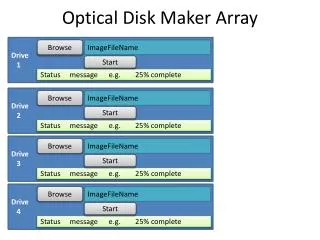
Optical Disk Maker is a powerful tool designed for seamless image copying across multiple drives. This software allows you to select image files, verify source and destination disks, and monitor the status of your image copy operation in real-time. Each drive can operate independently, ensuring efficient processing. The user-friendly interface includes a browse function for easy file selection, a start button that indicates readiness, and detailed status updates throughout the process. Additional features like verification pass and multi-threaded DiskIO enhance performance and reliability.

Comprehensive Guide to Optical Disk Maker for Multi-Drive Image Copying
E N D
Presentation Transcript
Drive 1 Browse ImageFileName Start Status message e.g. 25% complete Optical Disk Maker Array Drive 2 Browse ImageFileName Start Status message e.g. 25% complete Drive 3 Browse ImageFileName Start Status message e.g. 25% complete Drive 4 Browse ImageFileName Start Status message e.g. 25% complete
Optical Disk Maker Array • INI file with default file for each drive or one name means all drives use same file • BROWSE button allows selection of alternate image file • START button • Turns green when source file and destination disk are verified as available • Clicking when green begins image copy • STATUS window shows status of image copy or other error messages • Separate program to “Learn” or embed on second screen? • Verify pass after write? • Each “DiskIO” runs in a separate thread