
Audio Recording Setup Guide: Selecting Vocals and Adjusting Effects
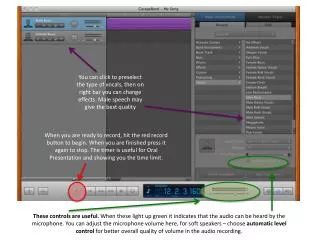
This guide explains how to set up audio recording effectively. Start by selecting the type of vocals to preselect, which can be adjusted for optimal output. For the best quality, male speech is recommended. Once prepared, simply hit the red record button to start recording and press again to stop. The built-in timer is beneficial for oral presentations, helping you manage time limits. The green light indicates audible input, and you can adjust microphone volume or activate automatic level control for improved audio quality.

Audio Recording Setup Guide: Selecting Vocals and Adjusting Effects
E N D
Presentation Transcript
You can click to preselect the type of vocals, then on right bar you can change effects. Male speech may give the best quality When you are ready to record, hit the red record button to begin. When you are finished press it again to stop. The timer is useful for Oral Presentation and showing you the time limit. These controls are useful. When these light up green it indicates that the audio can be heard by the microphone. You can adjust the microphone volume here, for soft speakers – choose automatic level control for better overall quality of volume in the audio recording.
