
Uploaded by
melissa-becker
2 SLIDES
150 VUES
20LIKES
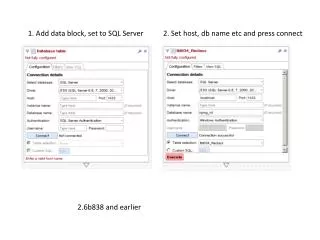
1. Add data block, set to SQL Server
DESCRIPTION
This guide covers the steps to configure a data block for SQL Server, focusing on common connection issues. Starting from version 2.6b838 and earlier, you'll learn how to set the host, database name, and connection parameters. We'll explore the process of adding a data block, changing settings for SQL Server, and the solutions to common errors encountered during connection attempts. This information is crucial for ensuring seamless database connectivity and optimization.
Download
1 / 2
Télécharger la présentation 
1. Add data block, set to SQL Server
An Image/Link below is provided (as is) to download presentation
Download Policy: Content on the Website is provided to you AS IS for your information and personal use and may not be sold / licensed / shared on other websites without getting consent from its author.
Content is provided to you AS IS for your information and personal use only.
Download presentation by click this link.
While downloading, if for some reason you are not able to download a presentation, the publisher may have deleted the file from their server.
During download, if you can't get a presentation, the file might be deleted by the publisher.
E N D
Presentation Transcript
1. Add data block, set to SQL Server 2. Set host, db name etc and press connect 2.6b838 and earlier
3. Add data block, change to SQL Server 4. Set parameters, click connect, get error 2.7b351









More Related