Make makefiles
This guide presents an overview of using Makefiles for automating processes in bioinformatics, particularly for managing genome analysis workflows. By defining rules and prerequisites, users can streamline their data processing tasks. Simple examples demonstrate how to set up targeted recipes, handle dependencies, and utilize special variables. The content is geared towards both beginners and seasoned users aiming to maximize the efficiency of their bioinformatics projects through effective Makefile strategies.

Make makefiles
E N D
Presentation Transcript
Make makefiles pipelining for the masses
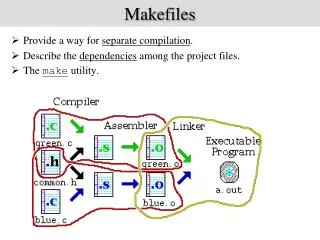
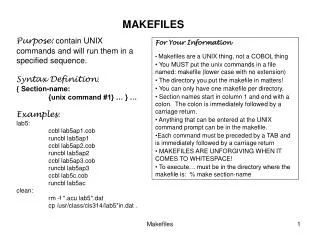
Make is based on set of rules # this is a remark target : prerequisites ... recipe_line1 recipe_line2 ... <Tab>
Simple example Recipe will be executed if either:1. Target does not exist2. Target is olderthan prerequisite Leg.pdf : Leg.tree R < plotTree.RLeg.tree Leg.tree: Leg.alnRAxML -f a -m GTRGAMMA -s Leg.aln> Leg.tree Leg.aln : Lpne.alnLdra.alnLisr.alnLjor.alnperlfastaMsaConcat.plLpn.alnLdra.aln… > Leg.aln Lpne.aln : Lpne.fasta prank -F Lpne.fasta > Lpne.aln Ldra.aln : Ldra.fastaprank -F Ldra.fasta> Ldra.aln Lisr.aln : Lisr.fasta prank -F Lisr.fasta> Lisr.aln Lsha.aln : Lsha.fasta prank -F Lsha.fasta> Lsha.aln
Makefile is a tree Recipe will be executed if either:1. Target does not exist2. Target is olderthan prerequisite
Simple example Makefile makes the first target (the order of the rest is not important Leg.pdf : Leg.tree R < plotTree.RLeg.tree Leg.tree: Leg.alnRAxML -f a -m GTRGAMMA -s Leg.aln> Leg.tree Leg.aln : Lpne.alnLdra.alnLisr.alnLjor.alnperlfastaMsaConcat.plLpn.alnLdra.aln… > Leg.aln Lpne.aln : Lpne.fasta prank -F Lpne.fasta > Lpne.aln Ldra.aln : Ldra.fastaprank -F Ldra.fasta> Ldra.aln Lisr.aln : Lisr.fasta prank -F Lisr.fasta> Lisr.aln Lsha.aln : Lsha.fasta prank -F Lsha.fasta> Lsha.aln
Variables alns= Lpne.alnLdra.alnLisr.alnLjor.aln Leg.tree.pdf : Leg.tree R < plotTree.RLeg.tree Leg.tree: Leg.alnRAxML -f a -m GTRGAMMA -s Leg.aln> Leg.tree Leg.aln : $(alns)perlfastaMsaConcat.pl$(alns) > Leg.aln Lpne.aln : Lpne.fasta prank -F Lpne.fasta > Lpne.aln Ldra.aln : Ldra.fastaprank -F Ldra.fasta> Ldra.aln Lisr.aln : Lisr.fasta prank -F Lisr.fasta> Lisr.aln Lsha.aln : Lsha.fasta prank -F Lsha.fasta> Lsha.aln
Variables dir= ~/Legionella/Genomes/phase1/ alns= $(dir)Lpne.aln$(dir)Ldra.aln$(dir)Lisr.aln … $(dir)Leg.tree.pdf : $(dir)Leg.tree R < plotTree.R$(dir)Leg.tree $(dir)Leg.tree: $(dir)Leg.alnRAxML -f a -s $(dir)Leg.aln> $(dir)Leg.tree $(dir)Leg.aln : $(alns)perlfastaMsaConcat.pl$(alns) > $(dir)Leg.aln $(dir)Lpne.aln : $(dir)Lpne.fasta prank -F $(dir)Lpne.fasta > $(dir)Lpne.aln $(dir)Ldra.aln : $(dir)Ldra.fastaprank -F $(dir)Ldra.fasta> $(dir)Ldra.aln $(dir)Lisr.aln : $(dir)Lisr.fasta prank -F $(dir)Lisr.fasta> $(dir)Lisr.aln $(dir)Lsha.aln : $(dir)Lsha.fasta prank -F $(dir)Lsha.fasta> $(dir)Lsha.aln
Special Variables dir= ~/Legionella/Genomes/phase1/ alns = $(dir)Lpne.aln$(dir)Ldra.aln$(dir)Lisr.aln … $(dir)Leg.tree.pdf : $(dir)Leg.tree R < plotTree.R$^ $(dir)Leg.tree: $(dir)Leg.alnRAxML -f a -s $^> $@ $(dir)Leg.aln : $(alns)perlfastaMsaConcat.pl$^ > $@ $(dir)Lpne.aln : $(dir)Lpne.fasta prank -F $^ > $@ $(dir)Ldra.aln : $(dir)Ldra.fastaprank -F $^ > $@ $(dir)Lisr.aln : $(dir)Lisr.fasta prank -F $^ > $@ $(dir)Lsha.aln : $(dir)Lsha.fasta prank -F $^ > $@ Useful special variables: $@ - the target $^ - all prerequisites $< - first prerequisite
Rulez dir= ~/Legionella/Genomes/phase1/ alns = $(dir)Lpne.aln$(dir)Ldra.aln$(dir)Lisr.aln … $(dir)Leg.tree.pdf : $(dir)Leg.tree R < plotTree.R$^ $(dir)Leg.tree: $(dir)Leg.alnRAxML -f a -s $^> $@ $(dir)Leg.aln : $(alns)perlfastaMsaConcat.pl$^ > $@ %.aln : %.fasta prank -F $^ > $@ Rules will simplify your makefile and raise level of abstraction Another useful special variable is $* that matches %
Rulez dir= ~/Legionella/Genomes/phase1/ alns = $(dir)Lpne.aln$(dir)Ldra.aln$(dir)Lisr.aln … %.tree.pdf : %.tree R < plotTree.R$^ %.tree : %.alnRAxML -f a -s $^> $@ $(dir)Leg.aln : $(alns)perlfastaMsaConcat.pl$^ > $@ %.aln : %.fasta prank -F $^ > $@ Intermediate files, which are created by rules and are not specified as targets themselves, are by default deleted after no longer needed. (in a few slides we'll see how to change that behavior) General rules can be transferred among makefiles
Some more variables dir= ~/Legionella/Genomes/phase1/ alns = $(dir)Lpne.aln$(dir)Ldra.aln$(dir)Lisr.aln … ALIGN = prank -F RECONSTRUCT = RAxML-f a -s %.tree.pdf : %.tree R < plotTree.R$^ %.tree : %.aln $(RECONSTRUCT) $^> $@ $(dir)Leg.aln : $(alns)perlfastaMsaConcat.pl$^ > $@ %.aln : %.fasta $(ALIGN) $^ > $@ Use variables for things you think you might want to change between runs (e.g., BLAST flags)
Some functions (there are many many more…) $(addsuffix<SUFF>,<LIST>) $(addsuffix .ext,adir/b) => a.extdir/b.ext $(addprefix <PREF>,<LIST>) $(addprefixdir/,a b.ext) => dir/a dir/b.ext $(dir<LIST>) $(dirtmp/a dir/b.ext c) => temp/ dir/ ./ $(notdir<LIST>) $(notdirdir/b.ext c) => b.ext c $(basename<LIST>) $(notdira.Rdir/b.extc) => a dir/b c $(shell <command>)
Function usage dir= ~/Legionella/Genomes/phase1/ alns = $(addprefix $(dir), Lpne.alnLdra.alnLisr.aln …) ALIGN = prank -F RECONSTRUCT = RAxML-f a -s %.tree.pdf : %.tree R < plotTree.R$^ %.tree : %.aln $(RECONSTRUCT) $^> $@ $(dir)Leg.aln : $(alns)perlfastaMsaConcat.pl$^ > $@ %.aln : %.fasta $(ALIGN) $^ > $@
Function usage dir= ~/Legionella/Genomes/phase1/ alns= $(addprefix $(dir),$(addsuffix.aln, LpneLdraLisr …)) ALIGN = prank -F RECONSTRUCT = RAxML-f a -s %.tree.pdf : %.tree R < plotTree.R$^ %.tree : %.aln $(RECONSTRUCT) $^> $@ $(dir)Leg.aln : $(alns)perlfastaMsaConcat.pl$^ > $@ %.aln : %.fasta $(ALIGN) $^ > $@
More functions $(shell <command>) Executes shell command and returns values as list (newlines are turned to spaces). $(shell cat b.ext) => the content of b.ext (as a list) $(LIST:.fas=.aln) Changes all extensions of LIST Legs = Lpne.fasLdra.fasLisr.fasLjor.fas $(Legs:.aln=.fas) => Lpne.alnLdra.alnLisr.alnLjor.aln
Function usage dir= ~/Legionella/Genomes/phase1/ alns= $($(shell ls $(dir)*.fasta):.fasta=.aln) ALIGN= prank -F RECONSTRUCT = RAxML-f a -s %.tree.pdf : %.tree R < plotTree.R$^ %.tree : %.aln $(RECONSTRUCT) $^> $@ $(dir)Leg.aln : $(alns)perlfastaMsaConcat.pl$^ > $@ %.aln : %.fasta $(ALIGN) $^ > $@
Special targets dir= ~/Legionella/Genomes/phase1/ alns= $($(shell ls $(dir)*.fasta):.fasta=.aln) ALIGN = prank -F RECONSTRUCT = RAxML-f a -s All : $(dir)Leg.tree.pdf %.tree.pdf : %.tree R < plotTree.R$^ %.tree : %.aln $(RECONSTRUCT) $^> $@ $(dir)Leg.aln : $(alns)perlfastaMsaConcat.pl$^ > $@ %.aln : %.fasta $(ALIGN) $^ > $@ clean: rm -vf$(dir)Leg.tree.pdf $(dir)Leg.tree$(dir)*.aln .SECONDARY: <targets>Intermediate targets not to removed (no target will save all) .Phony : <targets>A phony target is one that is not really the name of a file. It is just a name for some commands to be executed when you make an explicit request
Invoking makefile By default run make to execute the first target of the file called makefile > make You can invoke a specific target in a specific file: > make -f <makefilename> <TARGET> make -f makeTree.mk clean You can also pass values of variables (will override variables with in the makefile > make -f <makefile name> <VAR>=<value> make -f makeTree.mk DIR=/mydir/
Useful flags for make file -j <n>: use n threads (without n - as many as possible) as makefile knows the dependencies he can run the non-dependent recipes in parallel… -n : just echo commands, do not excute -d : debug (shows you what makefile thinks)
Let's check out some Real-life examples
Here are some makefiles I did • A real makefile example:http://www.tau.ac.il/~davidbur/makePhylogeny.mk • Huge (but well documented) makefile:http://www.tau.ac.il/~davidbur/makeCompileFeaturesByPtts.makefile • I use such a makefile to run the one in (2):http://www.tau.ac.il/~davidbur/makefile • This makefile creates a makefile similar to (3) and executes it (getting weird, isn't it…):http://www.tau.ac.il/~davidbur/makeLearningHappen.makefile
useful tips and hints • -before the commnad will tell make to continue even if the execution of that line fails • When using "$", for example in a Perl oneliner, use $$ to let makefile know you mean the character '$' • Beware of extra spaces at the end of lines • You can use the program/script itself as part of prerequisit • Some time it is useful to invoke make from within a makefile • You can use include FILE to add the content of FILE to this point in the makefile
References GNU make tutorial, everything you want to know about make: http://www.gnu.org/software/make/manual/make.html Eyali's Blog in the post (my initial inspiration): http://lifeofadataminer.blogspot.co.il/2009/08/writing-makefile-instead-of-pipeline.html A pipeline is a make (I think his initial inspiration): http://archive.nodalpoint.org/2007/03/18/a_pipeline_is_a_makefilehttp://archive.nodalpoint.org/2007/03/18/a_pipeline_is_a_makefile