Download
1 / 28
280 likes | 417 Vues
In this session, we address a common misunderstanding in programming concepts as highlighted by a student's request: "I want it to go forward, then turn for five seconds, then stop and go back." We will explore the potential errors in this program, the underlying beliefs leading to such misconceptions, and how to correct them. Through troubleshooting techniques, we will analyze and break down engineering problems, demonstrating the importance of planning and iterative design in programming. Emphasizing teamwork and problem-solving skills, we will review key concepts in a supportive learning environment.

E N D
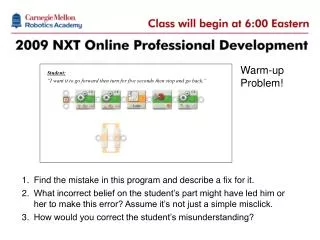
Student: “I want it to go forward then turn for five seconds then stop and go back.” NXT-GOnline Professional DevelopmentClasses will begin at 3:30pm EDT Warm-up Problem! • Find the mistake in this program and describe a fix for it. • What incorrect belief on the student’s part might have led him or her to make this error? Assume it’s not just a simple misclick. • How would you correct the student’s misunderstanding?
Slalom Challenge • How was it? • Line Tracking questions? • What problems did you encounter? • Slowed it down too far • Thin tape, robot overshoots • Fatter tape! • Don’t stretch out the electrical tape
Troubleshooting 4-2 • What is the student trying to do?
Troubleshooting 4-2 • What was wrong? (Use your marker) Doesn’t move past the line before turning Moves a set distance each time instead of Unlimited; “jams” the loop!
Troubleshooting 4-1 “It should go forward for one second, then turn until it sees the wall, but it doesn’t ever turn.” • Focus on the misconception • What is it? • How would you guide a student to a correct understanding?
Student: “I want it to go forward then turn for five seconds then stop and go back.” What happened here? • Not all problems are on the code level • Treating this as a “program” problem is doomed • There’s more to programming than programs! “Kobayashi Maru” problem
What’s Wrong? • Misunderstandings occur at many levels • If you take the problem at face value... • This isn’t a “picked the wrong mode” problem • Student misunderstanding is on the level of behavior planning and selection • What is a good way to do planning?
Obstacle Course Prep • Re-view: NVT Obstacle Course 1 • What is the first problem solving technique? • Analysis • Break down the problem into smaller pieces • What is the second problem solving technique? • Iterative Design • Build the solution around each piece in order • The secret to programming is not-programming • Failing to plan is… • … planning to fail
Analysis • NVT Obstacle Course 2-3 • Break the problem down into steps • Steps 1-5 match the stated objectives • Review your analysis • What did we find? • We missed some… • Add them in (2.5 and 3.5) • Work in Progress!
Iterative Design • NVT Obstacle Course 4-5 • Failed approaches • Everything at once • Fails why? • Everything in pieces • Fails why? • Iterative approach • Do one step • Test • Do next step; repeat
Solve the Problem • Complete the challenge • DON’T use steps 6-8 in the video! • Abbreviated Journal Assignment • Present (1 min) on one interesting problem you found and solved • Compressed version of multi-day class work session • Checkpoints • Each time you reach a whole-numbered objective, write the number of the objective in chat (private to me if you want) • If you get done early… • Formalize your presentation about the problem in your journal
Presentations “One interesting problem you found and solved” • Present your experience • Would you like to use visuals or just audio? • 1 minute limit per presenter
Engineering in the Classroom • Project-based learning • Context • Teamwork • Problem solving • Time management
Engineering in the Classroom • Supports groups working at different paces • Checkpoints • Formative feedback for pacing • Mitigate off-course errors • Documentation (Journal + Presentation) • Summative and formative feedback • Reflective practice • Concrete progress • Every group can see and gauge its progress • Deadlines and performance are not arbitrary
What can you teach with a robot? So far: • Science, Technology, Engineering, Mathematics • Programming, Automation • Algebra, physics • Money, jobs • Teamwork, problem solving, social skills, creativity, expression, high level thinking, decision making • Documentation, technical lingo, reading and writing technical material • Scaling (math) • Programming logic • Data logging, analysis • Color (wavelengths of light) • Thresholds (cutoffs) Add new ideas here
Choose your Challenge • NVT Challenges • Choose one Challenge for homework • Different skills, different focuses
Homework • Complete the Additional Challenge you picked • Document one interesting problem+solution you encounter • Post your solution and journal entry in the Wk5 area • Poster Assignment • Identify one critical concept we have covered (or is related to something we have covered), that you think will be most useful to your students • Create a poster in any format you want that will help to explain the concept to your students • Some format ideas: Real paper (take a picture), digital paper, PowerPoint, HTML, Flash, blog entry…
Closing Thoughts • Class activity: Review • Line Following • Troubleshooting revisited • Class activity: Problem Solving • Teacher concept: More to Programming than Programs • Engineering concept: Analyzing a problem • Engineering concept: Iterative Design • Class activity: Engineering • Class concept: Journaling and Presenting • Teacher concept: Engineering in the Classroom
Poster Notes • Concept examples • Program flow • Line tracking explained • How to find a threshold • The Three Commandments of Switch-Loops • Meta-concept examples • Why sensors matter to robots • Iceberg: Surface Problem vs. Real Problem • Top 10 Real Math opportunities in NXT-G robotics
Bonus: Types of Mistakes • Syntax • Mechanical structure of the program • Move Block: Motor C, unlimited, 75% power • Robot Semantics • Meanings of those commands • Turn on the robot’s left motor at 75% power • Context, Intent, and Planning • Higher level semantics • Effects in environmental context • Intended effects
Syntax Errors • Illegal formation of commands • Syntax mistakes are hard to make in NXT-G • Example: Disconnected icon
Robot-Semantic Errors • Mistakes about the meaning of a command • Example: Duration vs. Unlimited • Student does not realize program flow implications and uses Duration in a Forward until Touch behavior • Example: Reversed motors (L/R) • Student misinterprets Motor C as the right motor, and the robot turns the wrong way
Environment-Semantic(Context) Errors • Mistakes because of environmental constraints or conditions • Example: Light Sensor threshold • Student calculates threshold in morning, runs in afternoon • Example: Sharpness of line track • Student’s robot does not turn hard enough in a line track and the robot “loses” the line going around a curve
Program-Intent Mismatch Errors • Mistakes because student chooses an inappropriate programmed behavior for a desired robot effect • Example: Wrong way • Student tries to copy-paste a left-side line track, but takes a similar-looking right-side track instead and the robot goes the wrong way at a fork • Example: Wrong wait • Student tries to implement an obstacle-detection behavior using Wait Blocks
Problem-Semantic (Planning) Errors • Mistakes because student’s intended action is incorrect • Example: Wrong Turn • Student misreads the board and plans a left turn instead of a right turn • Example: Missing Step • Student wants to move two dark lines, but does not move clear of the first dark line before looking for the second