Manual Upload of HESA Institution Level Data via ASP.NET Web Application
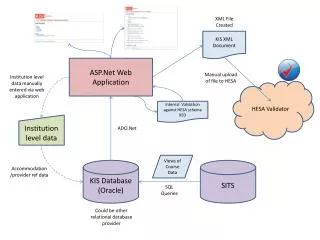
This guide details the manual upload process for HESA Institution Level data through an ASP.NET web application. It includes information on validating data against the HESA schema using internal validation methods. Further, it outlines how to access institution-level data through ADO.NET views in an Oracle database, along with SQL query examples for accommodation data. For more information, contact Damian O’Brien at damian.obrien@falmouth.ac.uk or visit our blog.

Manual Upload of HESA Institution Level Data via ASP.NET Web Application
E N D
Presentation Transcript
XML File Created KIS XML Document ASP.Net Web Application Manual upload of file to HESA Institution level data manually entered via web application HESA Validator Internal Validation against HESA schema XSD Institution level data ADO.Net Views of Course Data KIS Database(Oracle) SITS Accommodation /provider ref data SQL Queries Could be other relational database provider
<?xml version="1.0" encoding="utf-8" ?> - <Institution> <RECID>12061</RECID> <UKPRN>10008640</UKPRN> <INSTUPPER>4830</INSTUPPER> <INSTLOWER>3000</INSTLOWER> <INSTBEDS>1439</INSTBEDS> <PRIVATEUPPER>3261</PRIVATEUPPER> <PRIVATELOWER>2625</PRIVATELOWER> <ACCOMURL>http://www.falmouth.ac.uk</ACCOMURL> <NSP>1</NSP> - <KISCourse> <KISCOURSEID>BAADVTFF</KISCOURSEID> <KISTYPE>1</KISTYPE> <UCASCOURSEID>N561</UCASCOURSEID> <TITLE>BA(HONS) ADVERTISING (FT)</TITLE> <UKPRNAPPLY>10008640</UKPRNAPPLY> <CRSEURL>http://www.falmouth.ac.uk</CRSEURL> <JACS>P420</JACS> <TTCID>0</TTCID> <PTONLY>0</PTONLY> <LEVEL>F</LEVEL> <DISTANCE>0</DISTANCE> <ENGFEE>9000</ENGFEE> <NIFEE>9000</NIFEE> <SCOTFEE>9000</SCOTFEE> <WAFEE>9000</WAFEE> <VARFEE>20</VARFEE> <FEETBC>0</FEETBC> <SUPPORTURL>http://www.falmouth.ac.uk</SUPPORTURL> <EMPLOYURL>http://www.falmouth.ac.uk</EMPLOYURL> <NONCREDITASSESS>0</NONCREDITASSESS> <LTURL>http://www.falmouth.ac.uk</LTURL> <ASSURL>http://www.falmouth.ac.uk</ASSURL> - <HESACourse> <HESACOURSEID>BAADVTFF/BAADVTFF</HESACOURSEID> <HESAYEAR>2010</HESAYEAR> </HESACourse> - <CourseStage> <WRITTEN>20</WRITTEN> <PRACTICAL>60</PRACTICAL> <COURSEWORK>20</COURSEWORK> <ASSACT>A</ASSACT> <SCHEDULED>20</SCHEDULED> <INDEPENDENT>50</INDEPENDENT> <PLACEMENT>30</PLACEMENT> <LTACT>A</LTACT> <STAGE>1</STAGE> </CourseStage> - <CourseStage> <WRITTEN>20</WRITTEN> <PRACTICAL>60</PRACTICAL> <COURSEWORK>20</COURSEWORK> <ASSACT>A</ASSACT> <SCHEDULED>20</SCHEDULED> <INDEPENDENT>50</INDEPENDENT> <PLACEMENT>30</PLACEMENT> <LTACT>A</LTACT> <STAGE>2</STAGE> </CourseStage> </KISCourse> </Institution>
Further info… • Please contact • Damian O’Brien • Damian.Obrien@falmouth.ac.uk • Or check out the blog… • http://ucfxcricap.jiscinvolve.org/wp/2012/05/11/sits-kis/