
Uploaded by
oliver
27 SLIDES
380 VUES
270LIKES
CAD Modeling Tutorial: Creating a 3D Object with Extrusion and Construction Points
DESCRIPTION
Learn how to use dimensions, radius, and extrusion to create a 3D object with sketching, adding frozen points, and more in CAD.
Download
1 / 27
Télécharger la présentation 
CAD Modeling Tutorial: Creating a 3D Object with Extrusion and Construction Points
An Image/Link below is provided (as is) to download presentation
Download Policy: Content on the Website is provided to you AS IS for your information and personal use and may not be sold / licensed / shared on other websites without getting consent from its author.
Content is provided to you AS IS for your information and personal use only.
Download presentation by click this link.
While downloading, if for some reason you are not able to download a presentation, the publisher may have deleted the file from their server.
During download, if you can't get a presentation, the file might be deleted by the publisher.
E N D
Presentation Transcript
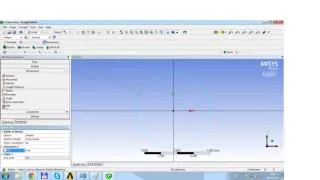
ZY or ZX plane, 4 points, (0;8), (0;12), (0.3, 10), (-0.3, 10), Draw, construction point, Dimensions, length/distance
Split block, O - grid block, select blocks Press “v”: all visible
Mesh, Surface mesh setup, • Max size 0.3 • Height 0.03 • Height ratio 1.25



More Related

Audio
Live Player