PowerPoint Display Bug on Pismo: Artifacts When Editing Text Boxes
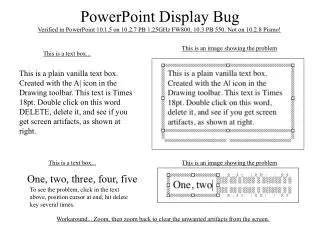
A display bug in PowerPoint version 10.2.7 on PB 1.25GHz shows artifacts when deleting text in text boxes. Users may encounter screen artifacts while editing text, particularly after repeatedly hitting the delete key. This issue has been verified on 10.1.5 and does not occur in version 10.3. A workaround is to zoom in and then zoom out to clear the artifacts. Screenshots illustrate the problem clearly. The bug primarily affects the visual representation of plain text boxes created with the Drawing toolbar, especially with Times 18pt font.

PowerPoint Display Bug on Pismo: Artifacts When Editing Text Boxes
E N D
Presentation Transcript
Verified in PowerPoint 10.1.5 on 10.2.7 PB 1.25GHz FW800, 10.3 PB 550. Not on 10.2.8 Pismo! PowerPoint Display Bug This is an image showing the problem This is a text box... This is a plain vanilla text box. Created with the A| icon in the Drawing toolbar. This text is Times 18pt. Double click on this word DELETE, delete it, and see if you get screen artifacts, as shown at right. This is a text box... This is an image showing the problem One, two, three, four, five To see the problem, click in the text above, position cursor at end, hit delete key several times. Workaround... Zoom, then zoom back to clear the unwanted artifacts from the screen.