Essential Concepts of Web Testing: Methods, Issues, and Best Practices
This comprehensive guide covers the fundamental concepts of web testing essential for modern QA engineers. It outlines the unique characteristics and challenges of testing web applications compared to traditional desktop applications. Key topics include handling new technologies like JavaScript and AJAX, usability testing, database testing, and various web testing tools. The document also discusses the importance of functional testing, performance testing, security testing, and best practices for ensuring high-quality web applications. Perfect for QA professionals seeking to enhance their skill set in web application testing.


Essential Concepts of Web Testing: Methods, Issues, and Best Practices
E N D
Presentation Transcript
Web Testing Main Concepts of Web Testing Dimo Mitev Snejina Lazarova Senior QA Engineer, Team Lead Senior QA Engineer, Team Lead SystemIntegrationTeam CRMTeam Telerik QA Academy
Table of Contents • Testing Web Applications • Main CharacteristicsAnd Issues • Main Web Testing Methods
Testing Web Applications Main Characteristics And Issues
Web-based Applications • Most software applications today are written as web-based applications • Being run in an Internet browser
Web Testing Issues • Testing a web application is quite a bit more difficult than testing the same functionality in a Windows Desktop application • Various issues are present: • Timing difficulties • Differencesbetween browsers • New technologies that make web browsing a rich, but difficult-to-test, experience
Web Testing Issues (2) • Web browsers don't provide clear visibility to what's happening on the page • The tester has no straight-forward way of consistently identifying an element on a web page and detecting changes in the element's state
Web Testing Issues (3) • New technologies introduce new testing issues • The same features that make web browsing a richer experience also present obstacles to testing • Asynchronous processes • Client side code running directly in the browser • Animation • Etc.
JavaScript • Before JavaScript the browser experience was completely server based • Entire pages were refreshed each timea button was clicked • With JavaScript you can have an action take place instantly without refreshing the page • This presents a whole new set of paths • They need to be checked to get full testing coverage
AJAX • AJAX = Asynchronous JavaScript And XML • JavaScript is capable of making calls to the server and updating selected portions of the page • From the testing perspective, AJAX may add a pause while information is retrieved from the server • AJAX is also "asynchronous" • Not all parts of the page are updated at one time
AJAX (2) • Handling AJAX • One of the principal ways AJAX can be handled is by waiting for a particular element to reach some state • E.g. "text content = '1234'"
Silverlight • Silverlight is a "plug in", object embedded to a standard web page • Runs right in the browser • Silverlight applications present unique testing issues • E.g. the Silverlight elements are not readily accessible • The user interface can be asynchronously updated • Elements are likely to be animated
Web Testing Tools • Web testing tools are a common type of test tool, used for: • Functional/Regression Testing • Load and Performance Testing • Web Site Security Testing • Web Site Management Testing • Mobile Web/App Testing
Web Testing Tools • Web testing tools are a common type of test tool, used for: • Scanning websites for broken or missing hyperlinks (Link checkers) • Static analysis on HTML, checking for conformance to standards
Web Page Functionality Test • Functionality Testing • Check all the links • the outgoing linksfrom all the pages from specific domain under test • all internal links • links jumpingon the same pages • links used to send the email • check if there are any orphanpages • check for brokenlinks
Web Page Functionality Test • Functionality Testing • Test forms in all pages • Check all the validations on each field • Check for the default values of fields • Wrong inputs to the fields in the forms • Options to create forms if any,form delete,view or modify the forms
Web Page Functionality Test • Functionality Testing • Cookies testing • Test the application by enabling or disabling the cookies in your browser options • Test if the cookies are encrypted before they are written to user machine • Check application securityby deleting the cookies
Web Page Functionality Test • Functionality Testing • Test HTML and CSS • Checking for syntax errors • Readable color schemas • Standard compliance • E.g. standards such W3C and ISO is followed
Web Page Functionality Test • Functionality Testing • Database testing • Testing the backend databases, like comparing the actual results with expected results
Web Page Functionality Test • Functionality Testing • Database testing basically include • Data validity testing • Test if any errors are shown while executing queries • Data Integritytesting • Maintained while creating, updating or deleting data in database • Check response time of queries • Test data retrieved from the database is shown accurately in the web application
Web Page Usability Test • Web page usability test • A method of simulating the user's way of experience • E.g., checking help links, contents in the page, checking menu options and their links, think times between the pages and message dialogs in the pages
Web Page Usability Test • Usability testing • Test for navigation • How the user surfs the web pages, different controls like buttons, boxes or how user using the links on the pages to surf different pages • Web site should be easy to use • Instructions should be provided clearly and correct(it means whether they satisfy purpose)
Web Page Usability Test • Usability testing • Content checking • Content should be logical,easy to understand and meaningful • Check for spelling errors • All the anchor text links should be working properly • Images should be placed properly with proper sizes
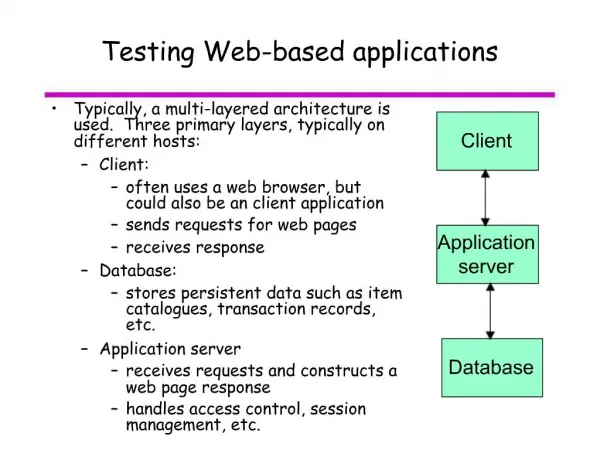
Web Page Usability Test • Usability testing • Interface Testing • The main layers are • Web server • Application server • Database server Check if all the interactions betweenthese serversare executedproperly
Web Page Usability Test • Usability testing • Compatibility Testing • Browser compatibility • Operating system compatibility • Mobile browsing • Printing options
Web Page Compatibility • Testing web page compatibility • A method of testing multiple browsers based on user requirements • The web page presentation depends on how well the components are used
Web Page Compatibility Test • Sample browser compatibility checklist • You can repeat these tests on different browsers and operating systems
Security Testing • Security Testing basically include • Testing for vulnerabilities of the web application • Test unauthorized access to secure pages should not be permitted • Restricted files should not be downloadable without appropriate access • Check sessions are automatically killed after prolonged user inactivity
Performance Testing • Performance Testing • Verifies web page responses as per expectations based on the environment • Also includes stress testing and load testing of the application
Testing With Different Networks • Testing a web application using different networks • Required due to different points a user may access the system from • E.g., a local intranet or an internet with a lower network speed • An application's performance and the accessibility are based directly on the network used • This is also part of performance testing
Other Web Testing Methods • There are many other types of testing that can be performed as part of Web Performance Testing: • Using different operatingsystems • Using different databases • Installing different versions of an operating system
Test Environment • Set up a test environment that is separate from your development and production environment • This includes a separate web server, database server, and application server if applicable
Web Testing Tools Questions? ? ? ? ? ? ? ? ? ? ? ?