New Features in Fast Labs View
10 likes | 141 Vues
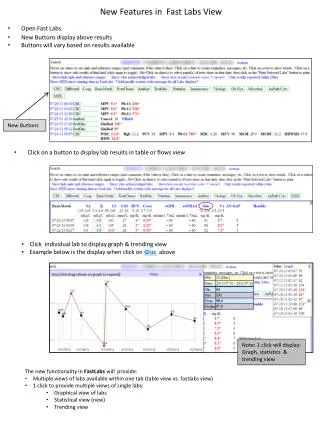
Discover the new features in Fast Labs that transform how you access lab results. With the updated interface, you can now view lab results in multiple formats—either in table or Fast Labs view—using a single click. New buttons have been added above the results for instant access to graphical, statistical, and trending views for individual labs. For instance, clicking on "Gluc" will display its graph, statistics, and trends. Enjoy a more efficient and informative lab results experience with these enhancements.


New Features in Fast Labs View
E N D
Presentation Transcript
New Features in Fast Labs View • Open Fast Labs • New Buttons display above results • Buttons will vary based on results available New Buttons • Click on a button to display lab results in table or flows view • Click individual lab to display graph & trending view • Example below is the display when click on Gluc above Note: 1 click will display: Graph, statistics & trending view • The new functionality in FastLabs will provide: • Multiple views of labs available within one tab (table view vs. fastlabs view) • 1 click to provide multiple views of single labs: • Graphical view of labs • Statistical view (new) • Trending view