
Uploaded by
pete
10 SLIDES
256 VUES
100LIKES
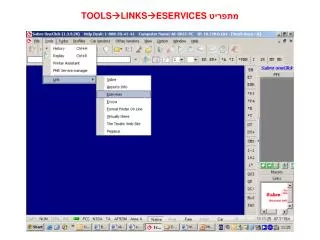
מתפריט TOOLS LINKSESERVICES
DESCRIPTION
מתפריט TOOLS LINKSESERVICES. מסך כניסה : הכנסת SIGN-IN סיסמה ו- PCC. נכנסים למסך הראשי של ה- Eservices. שורת התפריטים מציגה את האפשרויות הרבות של האתר:. דוגמא: TRAINING FORMAT QUICK REFERENCES מציג רשימה של נושאים עליהם ניתן להרחיב וללמוד:.
Download
1 / 10
Download Presentation

Télécharger la présentation
מתפריט TOOLS LINKSESERVICES
An Image/Link below is provided (as is) to download presentation
Download Policy: Content on the Website is provided to you AS IS for your information and personal use and may not be sold / licensed / shared on other websites without getting consent from its author.
Content is provided to you AS IS for your information and personal use only.
Download presentation by click this link.
While downloading, if for some reason you are not able to download a presentation, the publisher may have deleted the file from their server.
During download, if you can't get a presentation, the file might be deleted by the publisher.
E N D
Presentation Transcript
שורת התפריטים מציגה את האפשרויות הרבות של האתר:
דוגמא:TRAININGFORMAT QUICK REFERENCES מציג רשימה של נושאים עליהם ניתן להרחיב וללמוד:
בלחיצה, יפתח קובץ PDF. בדוגמה:המרת פקודות מאמדאוס ל-Sabre
כלי מיוחד למנהלים בתפריט Manager מאפשר להפיק דוחות סגמנטציה לפי פרמטרים שונים למשרד:
לחיפוש מידע לגבי חברות תעופה, שירותי קרקע וכד' יש להיכנס ל-DIRECT REFERENCE SYSTEM ׂ(DRS)
לבחור בנושא הרצוי airline
לבחור חברת תעופה לקבלת מידע כמו מספרי טלפון, מדיניות מטען ועוד







More Related

Audio
Live Player