
Uploaded by
qabil
1 SLIDES
126 VUES
10LIKES
Understanding EasiSpeak Recorder Light Indicators: A Quick Guide
DESCRIPTION
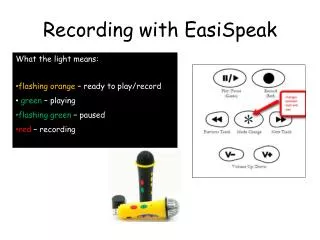
This guide explains the color-coded light indicators on the EasiSpeak recorder, essential for effective use. The flashing orange light means the device is ready to play or record, while a steady green indicates that playback is in progress. If the light is flashing green, the recorder is paused, and a solid red light signifies that the device is actively recording. Familiarizing yourself with these indicators will enhance your recording experience and ensure smooth operation.
Download
1 / 1
Télécharger la présentation 
Understanding EasiSpeak Recorder Light Indicators: A Quick Guide
An Image/Link below is provided (as is) to download presentation
Download Policy: Content on the Website is provided to you AS IS for your information and personal use and may not be sold / licensed / shared on other websites without getting consent from its author.
Content is provided to you AS IS for your information and personal use only.
Download presentation by click this link.
While downloading, if for some reason you are not able to download a presentation, the publisher may have deleted the file from their server.
During download, if you can't get a presentation, the file might be deleted by the publisher.
E N D
Presentation Transcript
Recording with EasiSpeak • What the light means: • flashingorange – ready to play/record • green – playing • flashing green – paused • red – recording







More Related