Efficient Attendant Console Operations for Enhanced Call Management
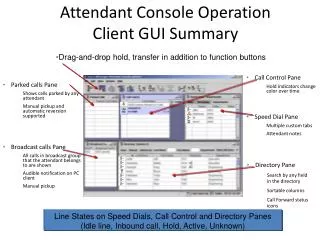
Elevate your call handling experience with our advanced Attendant Console Client GUI. This user-friendly interface features drag-and-drop functionality, making hold and transfer operations seamless. The Call Control Pane displays hold indicators that change color over time, while the Parked Calls Pane lets you easily view calls parked by any attendant. Enjoy features like manual pickup, automatic reversion, and customizable speed dials. With an audible notification system and a comprehensive directory pane for searchable, sortable columns, managing calls has never been easier.

Efficient Attendant Console Operations for Enhanced Call Management
E N D
Presentation Transcript
Attendant Console OperationClient GUI Summary • Drag-and-drop hold, transfer in addition to function buttons • Call Control Pane • Hold indicators change color over time • Parked calls Pane • Shows calls parked by any attendant • Manual pickup and automatic reversion supported • Speed Dial Pane • Multiple custom tabs • Attendant notes • Broadcast calls Pane • All calls in broadcast group that the attendant belongs to are shown • Audible notification on PC client • Manual pickup • Directory Pane • Search by any fieldin the directory • Sortable columns • Call Forward status icons Line States on Speed Dials, Call Control and Directory Panes(Idle line, Inbound call, Hold, Active, Unknown)