Managing and Editing Metadata Components in CLARIN Registry
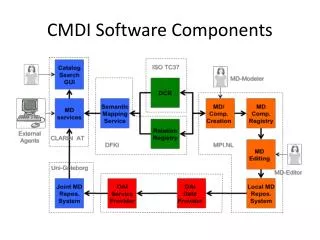
The CLARIN Component Registry, led by Patrick Duin at the Max Planck Institute for Psycholinguistics, enables long-term storage, browsing, and editing of component profiles. It provides a structured way to aggregate metadata and facilitate easy access to various components. For instance, components can describe personal contact information effectively using distinct metadata elements like Name, Address, Email, and Organization. Users can create and edit profiles for different resources, ensuring proper documentation and future compliance.

Managing and Editing Metadata Components in CLARIN Registry
E N D
Presentation Transcript
CMDI Component Registry Patrick Duin Max Planck Institute for Psycholinguistics Patrick.Duin@mpi.nl 2011
www.clarin.eu Purpose/Use Cases Register, Browse and Edit Register: provide long term storage of Component/Profiles Browse: provide easy access to Components/Profiles. Edit: Create new and edit existing Components/Profiles
www.clarin.eu Component/Profiles CLARIN Metadata component: An aggregation of metadata elements and components aimed at describing a specific aspect of a resource. Reusable Building block CLARIN Metadata Profile: A specification of an aggregation of metadata components that can be used to create metadata descriptions. The profile is used to describe all relevant aspects of a resource or collection. Metadata description of a resource
www.clarin.eu Example Component named “Contact”. Has metadata elements to describe a persons contact information: Name, Address, Email and Organisation. <CMD_ComponentSpec isProfile="false"> <Header> <ID>clarin.eu:cr1:c_1264757339280</ID> <Name>component-contact</Name> <Description>IMDI components</Description> </Header> <CMD_Component CardinalityMax="1" CardinalityMin="1" name="Contact"> <CMD_Element CardinalityMax="1" CardinalityMin="0" ValueScheme="string" ConceptLink="http://www.isocat.org/datcat/DC-2454" name="Name"/> <CMD_Element CardinalityMax="1" CardinalityMin="0" ValueScheme="string" name="Address"/> <CMD_Element CardinalityMax="1" CardinalityMin="0" ValueScheme="string" ConceptLink="http://www.isocat.org/datcat/DC-2521" name="Email"/> <CMD_Element CardinalityMax="1" CardinalityMin="0" ValueScheme="string" ConceptLink="http://www.isocat.org/datcat/DC-2459" name="Organisation"/> </CMD_Component> </CMD_ComponentSpec>
www.clarin.eu Example Profile • Goal: Create metadata for a video resource
www.clarin.eu Kleve-route: Resource A demo recording of one person explaining how to get to the city of Kleve using speech and gestures and another person listening. Recorded in Nijmegen on 2002-10-30. Titled “Route description to Kleve”. Recording is a video (MPEG) recording.
www.clarin.eu Kleve-route: Design A demo recording of one person explaining how to get to the city of Kleve using speech and gestures and another person listening. Recorded in Nijmegen on 2002-10-30. Titled “Route description to Kleve”. Recording is a video (MPEG) recording. Title, Description Elements Technical data Participants Components
www.clarin.eu Kleve-route: Profile VideoResource Name Title Description Participants Name Activity Contact TechnicalData Encoding
www.clarin.eu Edit: Add a new Component Create Participants Component
www.clarin.eu Edit: Create a new profile Reuse existing components!
www.clarin.eu Browse: Result Ready to be used in Metadata Editor (Arbil).
www.clarin.eu Publish your profiles • save = save in workspace and overwrite original (if there is no original then a new profile/component is created) • save as new = save in workspace as new, so original will still be there if editing an existing profile/component • Work is saved in a work space per user • Public space is open for everyone • Profile or Component can be made public when: • It is valid (e.g. all fields are filled in correctly). • It relies on already public components. When published, a copy is made to the public space. The user space version will still exist.
www.clarin.eu Profile to Metadata XML schema (“grammar”) Metadata Profile <xs:schema> ... </xs:schema> Name Title Arbil Name Participants <CMD> <Name> kleve-route </Name> </CMD> <CMD> <Name> nijmegen-route </Name> </CMD> <CMD>..<CMD> <CMD>..<CMD> <CMD>..<CMD>
www.clarin.eu Fine tune your profile • Give hints for other tools • Documentation: Add some explanation on how to use this element. This can for instance be used as a tooltip. • DisplayPriority: Should this element be used first in display
www.clarin.eu Import If you have Components or Profiles complying to the Component Schema (http://www.clarin.eu/cmd/general-component-schema.xsd) You can upload it by using the import functionality
www.clarin.eu Progress and future • We started with about: 15 Profiles and 120 Components (public) • Currently (after one year): 51 Profiles and 158 components (public) • Other tools (Arbil, MDService) interact with it and use the web services • Notable changes in last year: • Browsing is open to everyone • Saving profiles/components in private workspace without creating new profiles/components • Allow reordering of elements • Multilingual element support • Open registry pointing to component/profile (bookmark) e.g.: • http://catalog.clarin.eu/ds/ComponentRegistry/?item=clarin.eu:cr1:c_1271859438180 • Future: • Reference private profile schema’s, for easy test cycle • Simplify publishing (move a profile not copy) • Allow versioning of public profiles
www.clarin.eu Contact Component Registry can be found at: http://www.clarin.eu/cmdi Browsing the registry is open to everyone You need to be a member of CLARIN to edit and import Documentation is in: http://www.clarin.eu/cmdi Questions/Remarks sent to: cmdi@clarin.eu