
Repository Interface for Content Retrieval via Supported Protocols (HTTP, SwA, FTP, etc.)
This document outlines the design of an Application Repository Interface (ARI) that enables clients to interact with a repository using various supported protocols like HTTP, SwA, FTP, and GridFTP. The repository exposes a list of supported protocols as a resource property, allowing the client to specify a preferred protocol when requesting content via the GetContents method. The repository then returns a URI corresponding to the selected protocol for content resolution. Details on transport protocols, interactions, and data formats are also discussed, emphasizing flexibility and interoperability.

Repository Interface for Content Retrieval via Supported Protocols (HTTP, SwA, FTP, etc.)
E N D
Presentation Transcript
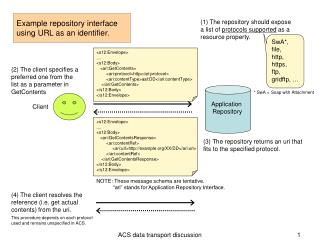
Application Repository Example repository interface using URL as an identifier. (1) The repository should expose a list of protocols supported as a resource property. SwA*, file, http, https, ftp, gridftp, … <s12:Envelope> .... <s12:Body> <ari:GetContents> <ari:protocol>http</ari:protocol> <ari:contentType>aaf:DD</ari:contentType> </ari:GetContents> </s12:Body> </s12:Envelope> (2) The client specifies a preferred one from the list as a parameter in GetContents * SwA = Soap with Attachment Client <s12:Envelope> .... <s12:Body> <ari:GetContentsResponse> <ari:contentRef> <ari:url>http://example.org/XX/DD</ari:url> </ari:contentRef> </ari:GetContentsResponse> </s12:Body> </s12:Envelope> (3) The repository returns an uri that fits to the specified protocol. NOTE: These message schema are tentative. “ari” stands for Application Repository Interface. (4) The client resolves the reference (i.e. get actual contents) from the uri. This procedure depends on each protocol used and remains unspecified in ACS. ACS data transport discussion
In case of using HTTP as transport protocol ... Client Component Archive Repository Http Server GetResourceProperty(AAEPR, supported_protocols) supported_protocols = SwA, http, ftp, gridftp, ... any interaction ? GetContents(AAEPR, protocol = 'http', key = 'aaf:DD') uri = http://example.org/XXX/DD security token = ???? http request (GET /XXX/DD HTTP/1.1) DD file NOTE: Archive Repository and Http Server may run either on the same node or separate nodes. NOTE: The first step (inquiry for supported protocols) may be performed just once. ACS data transport discussion
In case of using SwA as transport protocol ... Client Component Archive Repository GetResourceProperty(AAEPR, supported_protocols) supported_protocols = SwA, http, ftp, gridftp, ... GetContents(AAEPR, protocol = 'SwA', key = 'aaf:DD') base64 encoded data The real data is included in the response message. ACS data transport discussion