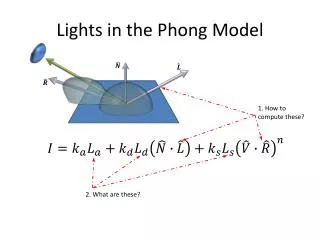
Lights in the Phong Model
170 likes | 270 Vues
Learn how to compute and describe light sources in the Phong Model, including ambient, directional, point, and spot lights. Explore illumination techniques, properties, and influences on rendered images.


Lights in the Phong Model
E N D
Presentation Transcript
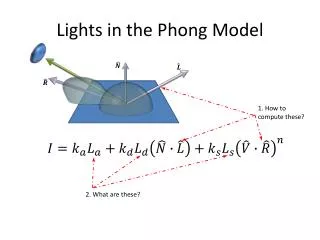
Lights in the Phong Model 1. How to compute these? 2. What are these?
Light source direction: • Look around you … • The light in Seattle: Indirect • background, … ambient • Sun light: Direct, very far away • coming from a constant direction(independent of where you are) • Light bulb at home: Direct • closer, shines from a fixed point • Light from the projector/desk lamp • How would you describe this? credit: http://mynasadata.larc.nasa.gov/Radiation_Explanation.html credit: http://www.truebeyonddesign.com/products-page/ http://www.apartmenttherapy.com/ny/lighting/best-product-tolomeo-desk-lamp-001066
What is Ambient Light? • Not in the real world! • Implementation dependent! • constant color added to illumination results • Maya scene file Rendered image Ambient light Material Property
What about the Sun? • How would you describe the incoming light source for this scene? http://www.planetware.com/picture/kansas-cottonwood-falls-tallgrass-prairie-national-preserve-flint-hills-national-prairie-us-ks108.htm
Directional Light • Direction is: • No position!! (where is the Sun?) • Light has no geometry and does not show up in final rendered image • Planes looks … flat • Maya Scene Rendered image Directional Light
What about the Light Bulb? • How would you describe the light source of these scenes? http://companyofburninghearts.wordpress.com/2010/03/18/mystic-clusters/ http://home.cogeco.ca/~richardastro2/
Point Light • Position () • For every visible position () • is unique! • Illumination is a function of relative position to lights! • Maya Scene Different vector for each visible point Point Lights Rendered image
Now, my desk lamp • How would you describe the light source of these scenes? http://www.how-to-refinish-hardwood-floors.wirze.com/ http://agreenliving.org/tag/concept-design/ http://www.mackayphotography.co.uk/light_pollution.htm http://0.tqn.com/d/drawsketch/1/0/N/J/eggsetup.jpg
Spot Light • Direction + Position: • Pointing direction • As in point light, for each visible point is unique! • Cone angle (θ) defines illumination range θ Different vector for each visible point
Maya Scene Cone boundaries Rendered image
Spotlight bounds Illumination at this point is • Position: • Main direction • : cone angle • θ: regions of full illumination • angle to position for illumination • If θ< < Illumination drops off according to: θ Region: fully illuminated Penumbra Region: gradual drop off
Drop off behavior P<1 p=0.1 P>1 p=0.2 Drop off p=1 p=20 p=30
scene No drop off Penumbra region
Implement Penumbra Region • For a visible position: • cos( If (cos( > cos( // < Full illumination else if (cos() < cos()) // > no illumination else Penumbra region θ A visibleposition
Distance Attenuation • Illumination is a function of • d = distance between light and visible position!! • Physics tells us • Did not follow physics in the rest of the model! • WAY too dark!! • Generally: d
How about ? • Let user specify each of thecomponents! OpenGL: Maya: Our ToyRayTracer:
General form of Phong Our Ray Tracer implements: