Introduction to Ruby Interactive Shell (IRB) and Basic Syntax Examples
This guide introduces users to the Ruby Interactive Shell (IRB) for different operating systems. It explains how to access IRB on Mac, Linux, and Windows, followed by basic examples showcasing Ruby syntax. Users will learn how to define methods, use the Math module, understand classes, and create a simple Greeter class that outputs personalized greetings. The examples illustrate the power and flexibility of Ruby, encouraging developers to experiment with code in an interactive environment.

Introduction to Ruby Interactive Shell (IRB) and Basic Syntax Examples
E N D
Presentation Transcript
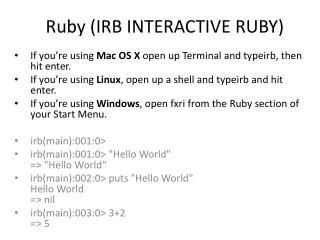
Ruby (IRB INTERACTIVE RUBY) If you’re using Mac OS X open up Terminal and typeirb, then hit enter. If you’re using Linux, open up a shell and typeirb and hit enter. If you’re using Windows, open fxri from the Ruby section of your Start Menu. irb(main):001:0> irb(main):001:0> "Hello World"=> "Hello World“ irb(main):002:0> puts "Hello World"Hello World=> nil irb(main):003:0> 3+2=> 5
irb(main):004:0> 3*2=> 6 • irb(main):005:0> 3**2=> 9 • irb(main):006:0> Math.sqrt(9)=> 3.0
Modules (Group codes by Topic) • Role one: Group similar methods together under a familiar name e.g. Math • Role two: Dot i.e. Receiver of a message
Methods • irb(main):010:0> def hirb(main):011:1> puts “Salam World!"irb(main):012:1> end=> nil • irb(main):019:0> def h(name = "World")irb(main):020:1> puts “Salam #{name.capitalize}!"irb(main):021:1> end=> nilirb(main):022:0> h "chris"Salam Chris!=> nilirb(main):023:0> hSalam World!=> nil
Class • irb(main):024:0> class Greeterirb(main):025:1> def initialize(name = "World")irb(main):026:2> @name = nameirb(main):027:2> endirb(main):028:1> defsay_Salamirb(main):029:2> puts “Salam #{@name}!"irb(main):030:2> endirb(main):031:1> defsay_Wasalamirb(main):032:2> puts “Wasalam #{@name}, come back soon."irb(main):033:2> endirb(main):034:1> end=> nil