Upgrading GENE-QM77 Rev. B.1: Converting Mini Card to mSATA
20 likes | 135 Vues
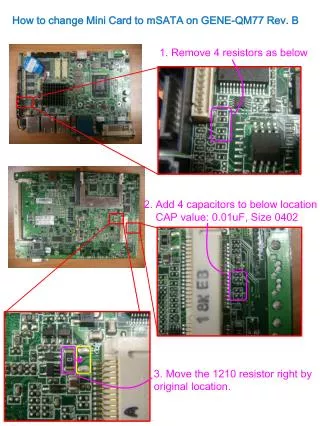
This guide details the process of changing the Mini Card to mSATA on the GENE-QM77 Rev. B.1 motherboard. Follow these steps: First, remove four resistors (R188, R195, R200, and R202). Next, add four capacitors (C610, C614, C628, and C631) with a value of 0.01uF and size 0402 at the specified locations. Additionally, move the 1210 resistor to the right from its original position. Finally, shift R519 to R518 according to the BOM changes provided. Ensure all components are replaced correctly for optimal performance.


Upgrading GENE-QM77 Rev. B.1: Converting Mini Card to mSATA
E N D
Presentation Transcript
How to change Mini Card to mSATA on GENE-QM77 Rev. B 1. Remove 4 resistors as below 2. Add 4 capacitors to below location CAP value: 0.01uF, Size 0402 3. Move the 1210 resistor right by original location.
BOM changes (1) Remove R188, R195, R200, R202 (2) Add C610, C614, C628, C631 (11C2501790; 0.01uF, 25V, 0402) (3) Move R519 to R518