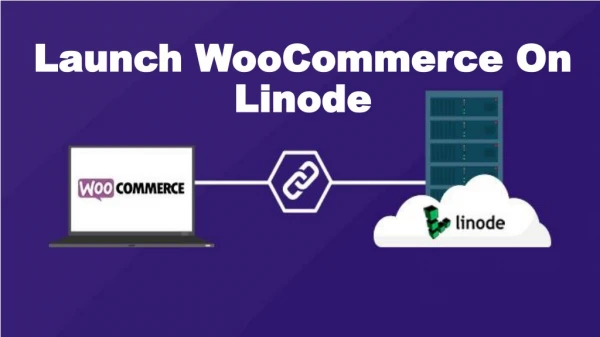
Checks before you launch your WooCommerce website
You have designed your website, curated your products, and are ready to launch your WooCommerce store. However, with the amount of work that goes into launching any new online store, there are chances that you may miss out on something. And this could be disastrous for your business.

Checks before you launch your WooCommerce website
E N D
Presentation Transcript
CHECKS BEFORE YOU LAUNCH YOUR WOOCOMMERCE WEBSITE You have designed your website, curated your products, and are ready to launch your WooCommerce store. However, with the amount of work that goes into launching any new online store, there are chances that you may miss out on something. And this could be disastrous for your business.
You have designed your website, curated your products, and are ready to launch your WooCommerce store. However, with the amount of work that goes into launching any new online store, there are chances that you may miss out on something. And this could be disastrous for your business. Missing out on any small detail could have severe consequences on your WooCommerce store. So to make sure that you do not sink in the doubtful feeling of what you may have left out, we have put down the essential checks before you launch your website.
Imagery and brand colors How the WooCommerce development company India designs your website reflects in the layout of your online store. It convinces people to engage with your services and also increases customer retention. Your website should be straightforward and functional. Here is what you should consider about your website design. Constant brand colors Your visitors will connect with you through your websites’ colors. The colors also let them recall your brand. Use the same colors through your WooCommerce site which creates an aesthetic appeal to your store and also builds your brand image. High-quality images The images of your product are the key deciding factor for a customer to decide whether or not to make a purchase. High-quality images shot with the appropriate lighting can instill the consumers buying decision. Optimize the photos so that they load fast without compromising on quality.
Adding a favicon helps Adding a favicon lets your customers keep coming back to you as your WooCommerce site stands out from the other tabs. Choose a favicon that blends with your brand image and which can be recognized by your consumers. Make your site easy to navigate through The WooCommerce development service keeps your traffic engaged on your site for long. Here is what they do. Spend time in designing the homepage Your homepage is what gives the viewer a perception of your brand. Put the best videos, images, and text on your homepage which will grab the viewers’ attention and compel them to spend time on your website.
Easy contact Upload the correct address, email id, and contact details which should be visible. This lets people contact you through various ways which in turn instill trust in your brand. 404 page The 404 pages will take the prospect back to the store in case they happen to click on any bad link. Adding a 404 page does not drift your visitors away to your competitor's website. Easy checkout page The checkout page is crucial. Design it such that it minimizes distraction. Also, place the cart icon across the site linking it to the checkout page for easy purchase. Landing time Two seconds is the maximum that your consumer can wait for your site to load. Else they abandon your WooCommerce site. So pay attention to your website loading time.
Ensure proper store functionality The WooCommerce store should not just look good but should be functional as well. Check the links All the links on your website should be working. Forms Fill out the contact form on your page to ensure that the submission process is working. Clear call to action Have a call to action to compel your visitors to buy on your website which is what will generate revenue for your business.
Multiple payment options Having a choice of several payment options does not lead to an abandoned cart. Ensure multiple options like credit and debit cards, cash on delivery, Stripe, PayPal, etc. to make the process easy for the buyer. Site accessibility The WooCommerce development agency will design the website such that it makes it easy for even a layman to navigate through the digital environment. Clear headings and page titles Using the H1 tag for the page title and the H2 tag for the subheadings can let viewers understand the layout of the WooCommerce site.
Alt text Adding Alt text to images and making the link descriptive are ways to make your website stand out. It lets viewers understand what the image is about just by reading the Alt Text or the link. Clear fonts The fonts should be simple and easy to read. Sort the e-commerce tasks The WooCommerce store is your virtual shop and you want to make it educative and welcoming to convert clients. Checkout process Work on your websites’ checkout process. It should not be tedious and frustrating.
Check the inventory Stock up your store before the launch. Go through every product to ensure that it meets the inventory level. Order communication A notification email should be sent out to ensure the confirmation of the order. The same method can be used to notify about abandoned carts and payment failure. Customer dashboard The customer dashboard should be simple and intuitive for lesser bounce backs and more repeat customers.
Optimize the site for SEO The e-commerce site cannot flourish without proper SEO. Meta descriptions Meta descriptions should be added to all the web pages and they should be compelling. This will appear as a SERP of your product or business compelling visitors to click on your website. URL structure Customize the structure of the URL to ensure that it explains your page clearly Site map Generate a sitemap which is the blueprint of your WooCommerce site that when submitted to Google enables it to crawl into your web page and index it as per its relevance.
Ensure proper legality Outline the policy of your store through a legal framework. Lay out the stores' terms and conditions and have a privacy policy in place. Test your WooCommerce site and launch it Now that you have checked all the points, test your store first so that you can identify any glitches. It always pays to get a real user to test your website. Get your site reviewed by your friends and family and if you get a satisfactory feedback then go ahead and launch our WooCommerce store. Resource
CONTACT US FOR INQUIRIES MAILING ADDRESS 203 Atulya IT Park, Khandwa Road, Indore, India EMAIL ADDRESS info@softgridcomputers.com WEBSITE https://www.softgridcomputers.com/