Optimizing Customer Queue Management in Airport Scenarios Using Assembly Modeling Techniques
This document outlines the queue management strategies for different customer types arriving at an airport. It discusses arrival rates for coach and first-class customers, server assignments, and wait times. The integration of modeling nodes such as Read, Write, Accumulate, Batch, and Unbatch is explained. Key concepts from earlier chapters are revisited to build a comprehensive simulation model. The focus is on utilizing these strategies to enhance operational efficiency and customer satisfaction during peak times.

Optimizing Customer Queue Management in Airport Scenarios Using Assembly Modeling Techniques
E N D
Presentation Transcript
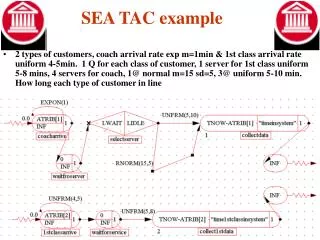
SEA TAC example • 2 types of customers, coach arrival rate exp m=1min & 1st class arrival rate uniform 4-5min. 1 Q for each class of customer, 1 server for 1st class uniform 5-8 mins, 4 servers for coach, 1@ normal m=15 sd=5, 3@ uniform 5-10 min. How long each type of customer in line
Chapt 7 (portions) • Read/ Write Nodes (pgs 222-228) • Assembly Modeling (pgs 239-262) • Accumulate Node • Batch/ Unbatch Node • Control Statements
Interface & Assembly • Build on Basic concepts from chapters 5 & 6 • Able to integrate/ interface software with other programs • Provided by reading inputs from files, spreadsheets, databases • Then outputted to files, spreadsheets….. • Able to model the assembly of entities into a single entity ie CPM, collect up to a certain # then release entities • Also retrieve entities that were combined, ie separate parts after they were batched together for a specific process
Read Node • Used to read one or more values from an external file • Table 2.9 Users Guide Node = readin Read from spreadsheet three columns of data 3 branches
Write Node • Used to write values to an external file ie .xls Called sentoxls put in file called airportque.xls send TNOW & ATRIB(2) real values 3 + decimal pt + 1 following
Write Example • Single server to obtain table with 4 columns, entity #, arrival time, wait time, system time
Assembly Modeling • Wait until four units of a order arrive before boxing and shipping • Start an operation that needs one bolt, one washer, one nut, spud wrench • Start activity “pour foundation” once activities of unslab elect, underslab, plumb, gravel & compact are completed • Accumulate • Batch • Unbatch
Accumulate Node • Collect entities until a certain number are reached • When achieved the node is released Save atrib of entity of: SR # til subsequent release # of branches FR # til 1st release
Batch Node • Collect entities until a certain number are is reached • Then release a single entity that represents the batch • Typically used for modeling pallets and loads of cars/ trucks that accumulate before moving Collecting values on ATRB..then released Batch from when Sorted on /default 1
UnBatch Node • Put entities of a batch back into the network or split an entity into multiple units • Individual entities of the batch are restored
Chapt 7 examples • Read example • 7-1 read the following into a model, valuse of ATRIB[0], ATRIB[1] and LTRIB[1] from file ATTRIBUTES.DAT for 1000 entities
Chapt 7 examples • Write example • 7-2 (b) write out the values of current simulated time, the first real attribute, and the first integer attribute of the current entity to the file TRACE.DAT
Chapt 7 examples • 7-9 Use ACCUMULATE to:a) all preceding activities must be completed before a successor can be started, b) any one activity must be completed before a follow one activity can be completed, c) 3 out of 5 activities must be completed before an activity can be completed • a) 3 predecessors
Chapt 7 examples • 7-9 Use ACCUMULATE to: b) any one activity must be completed before a follow one activity can be completed, c) 3 out of 5 activities must be completed before an activity can be completed • b) 1 predecessors Or use
Chapt 7 examples • 7-9 Use ACCUMULATE to:c) 3 out of 5 activities must be completed before an activity can be completed • c) 1 predecessors
Gravel Compact Form U/S plumb Vapor Barrier WWF U/S elect PERT Example • Collect entities until a certain number are is reached • When achieved the node is released • Concrete slab after excavation
PERT Example • Concrete slab after excavation
Control Statements • Class assignment • simulate model shown in figure 7-1 of book • show out put on xls chart • due 11/26
Where are we going • Skip Chapt 8, will do Chapt 9 11/19 • Chapt 10 11/26 • No class 12/3 • Projects due 12/10