How to Submit Work via Drop Box
10 likes | 127 Vues
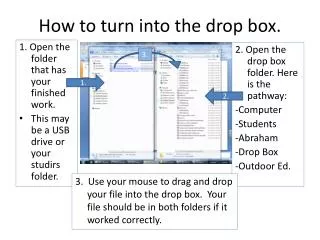
This guide provides step-by-step instructions on how to submit your completed work using the Drop Box system. Begin by locating the folder where your finished work is stored, which could be on a USB drive or your student folder. Navigate to the Drop Box folder by following the pathway: Computer > Students > Abraham > Drop Box > Outdoor Ed. Finally, use your mouse to drag and drop your file into the Drop Box. If successful, your file will appear in both folders.


How to Submit Work via Drop Box
E N D
Presentation Transcript
How to turn into the drop box. 3. 1. Open the folder that has your finished work. • This may be a USB drive or your studirs folder. 2. Open the drop box folder. Here is the pathway: -Computer -Students -Abraham -Drop Box -Outdoor Ed. 1. 2. 3. Use your mouse to drag and drop your file into the drop box. Your file should be in both folders if it worked correctly.