Essential Excel Functions for Vacation Planning and Financial Analysis
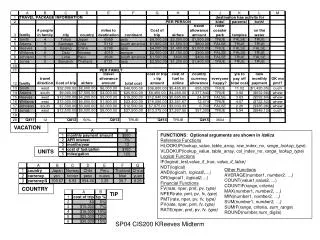
Enhance your vacation planning and financial analysis with key Excel functions. Use functions like HLOOKUP and VLOOKUP to efficiently search your data. Logical functions such as IF, AND, and OR help streamline decision-making processes. Dive into finance with functions like FV, NPER, PMT, PV, and RATE to manage and analyze your investments. Additionally, utilize other essentials such as AVERAGE, COUNT, MAX, MIN, SUM, and ROUND to organize and summarize your data effectively, ensuring a successful vacation budget and planning process.

Essential Excel Functions for Vacation Planning and Financial Analysis
E N D
Presentation Transcript
VACATION FUNCTIONS: Optional arguments are shown in italics Reference Functions HLOOKUP(lookup_value, table_array, row_index_no, range_lookup_type) VLOOKUP(lookup_value, table_array, col_index_no, range_lookup_type) Logical Functions IF(logical_test,value_if_true, value_if_false) NOT(logical) AND(logical1, logical2,…) OR(logical1, logical2,…) Financial Functions FV(rate, nper, pmt, pv, type) NPER(rate, pmt, pv, fv, type) PMT(rate, nper, pv, fv, type) PV(rate, nper, pmt, fv, type) RATE(nper, pmt, pv, fv, type) UNITS Other Functions AVERAGE(number1, number2, …) COUNT(value1,value2, ...) COUNTIF(range, criteria) MAX(number1, number2, …) MIN(number1, number2, …) SUM(number1, number2, …) SUMIF(range, criteria, sum_range) ROUND(number,num_digits) COUNTRY TIP SP04 CIS200 KReeves Midterm