Relate Command
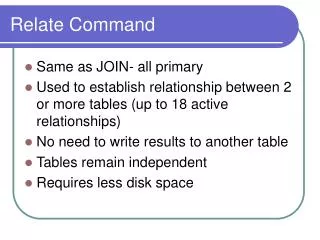
Relate Command. Same as JOIN- all primary Used to establish relationship between 2 or more tables (up to 18 active relationships) No need to write results to another table Tables remain independent Requires less disk space. Relate Requirements. All tables within same ACL project

Relate Command
E N D
Presentation Transcript
Relate Command • Same as JOIN- all primary • Used to establish relationship between 2 or more tables (up to 18 active relationships) • No need to write results to another table • Tables remain independent • Requires less disk space
Relate Requirements • All tables within same ACL project • Tables must have common key fields • Key fields must be same data type • Case/justification should be the same • Length not required to be the same, but know your data (works if primary longer) • Be aware of limitations of duplicates
Planning Relationships • Determine the objective- what results are you looking for? • Identify the two tables to be related • Identify the key field common to both tables • Examine key fields in both tables to ensure same length, type & structure • Identify parent table
Planning Relationships Can have direct relations
Planning Relationships as well as indirect relations *
Planning Relationships Also allows multiple relations (up to 18) *
Adding/Editing/Deleting Relations • The parent table is always identified by arrows pointing to child table • Files can not be JOINED if a relation exists • Before deleting relations, child fields need to be removed from all views of parent table
Creating New Views • Fields from the child table(s) can be added to the parent table for comparison • Expressions can be built based on the parent and child tables • Results can be extracted or exported • If extract record, relate is retained • If extract fields, the relate is lost and only the requested fields remain in the new table