Leveraging Regular Expressions for Text Manipulation and Email Filtering
This document explores the power of regular expressions in dealing with untrustworthy input and data display patterns. It emphasizes the use of regex in command-line tools and discusses practical applications like web searches, email filtering, and text manipulation in programming languages such as Java and Perl. Key concepts such as pattern matching, quantifiers, and capturing groups are illustrated using examples from email subject lines and string matching. The versatility of regex in finding relevant patterns in data is highlighted, showcasing its importance in modern programming tasks.

Leveraging Regular Expressions for Text Manipulation and Email Filtering
E N D
Presentation Transcript
Regular expressions CS201 Fall 2004 Week 11
Problem • input is very untrustworthy • stack smashing, for example • lots of data display patterns • can we combine these two insights? • yes- regular expressions
Example • command line: dir *.java • Boo.java Fred.java PainfulClass.java • Displays all the java programs in the directory • * - Kleene closure
RE and pattern matching • Web searches • email filtering • text-manipulation (Word) • Perl
How do we use it? • import java.util.regex.*; • specify a pattern • compile it • match • iterate
Specifying Patterns • strings: "To: cwm2n@spamgourmet.com" • can match case exactly • or match case insensitive • Range • [01234567] – any symbol inside the [] • [0-9] • [^j] – caret means "anything BUT j" • one symbol: • . – period manys any character • \\d – a digit, e.g.: [0-9] • \\D – a non-digit [^0-9] • \\w – character, part of a word [a-zA-Z_0-9]
Patterns • quantifier- how many times • * - any number of times (including zero) • .* • ? – zero or one time • A? - A zero or one time • + one or more times • A+ - must find at least one A • others (p. 476)
examples • find subject line of email • "Subject: .*" • finds: Subject: weather • finds: Subject: [POSSIBLE SPAM] get a degree! • Problem • also finds • How to be a British Subject: marry into the Royal
Anchors • tell us where to find what we are looking for • ^ - beginning of line • ^Subject: .* • $ - end of line • ^com • others on page 478
Alternation • subject line either SPAM or Rolex • ^Subject:.*(SPAM.* | Rolex.*)
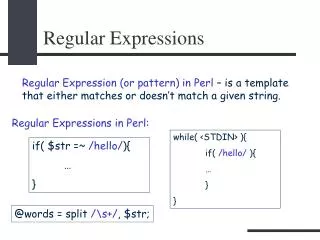
How to use it, really • Form a pattern • Pattern p = Pattern.compile("^Subject: .*"); • Create a Matcher • Matcher m = p.matcher(someBuffer); • iterate while(m.find()) System.out.println("Found text: "+m.group()); • find()- boolean, next occurence found • group() – String that matches
example package edu.virginia.cs.cs201.fall04; import java.util.regex.*; public class Tryout { String text = "A horse is a horse, of course of course.."; String pattern = "horse|course"; public static void main(String args[]) { Tryout t = new Tryout(); t.go(); } public void go() { Pattern p = Pattern.compile(pattern); Matcher m = p.matcher(text); while(m.find()) { System.out.println(m.group()+m.start()); } } } horse2 horse13 course23 course33