
Uploaded by
tulia
3 SLIDES
144 VUES
30LIKES
Exploring Dynamic Data Navigation in Widget Groups
DESCRIPTION
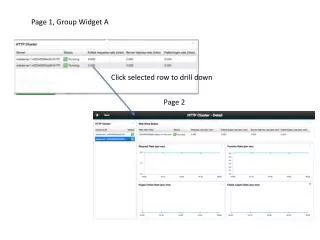
This document delves into the functionality of dynamic navigation within widget groups in our application. Users can interact with the left-hand side group widgets to trigger data changes displayed on the right-hand side. When a user clicks on a selected row in Page 1, the system drills down to display relevant information on Page 2. Through this interactive experience, users can easily manage and navigate complex datasets, thereby enhancing their analytical capabilities and overall user experience.
Download
1 / 3
Télécharger la présentation 
Exploring Dynamic Data Navigation in Widget Groups
An Image/Link below is provided (as is) to download presentation
Download Policy: Content on the Website is provided to you AS IS for your information and personal use and may not be sold / licensed / shared on other websites without getting consent from its author.
Content is provided to you AS IS for your information and personal use only.
Download presentation by click this link.
While downloading, if for some reason you are not able to download a presentation, the publisher may have deleted the file from their server.
During download, if you can't get a presentation, the file might be deleted by the publisher.
E N D
Presentation Transcript
Page 1, Group Widget A Click selected row to drill down Page 2
Page 1, Group Widget A Navigation definition
Page 2, left hand side group widget selection trigger right hand side data change Left hand side Group widget definition













More Related