
Using Tripod to Upload
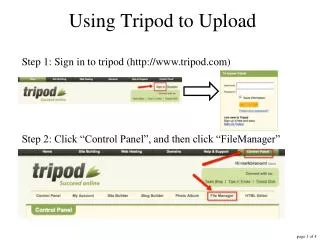
Using Tripod to Upload. Step 1: Sign in to tripod (http://www.tripod.com). Step 2: Click “Control Panel”, and then click “FileManager”. Step 3: Select “Upload via single files”. Step 4: Click “Browse”. A dialog box will pop up; locate the file you wish to upload. Step 5:

Using Tripod to Upload
E N D
Presentation Transcript
Using Tripod to Upload Step 1: Sign in to tripod (http://www.tripod.com) Step 2: Click “Control Panel”, and then click “FileManager”
Step 3: Select “Upload via single files” Step 4: Click “Browse” A dialog box will pop up; locate the file you wish to upload.
Step 5: Click the file you wish to upload, then click “open”. Here, my file “inclass.html”
If you have more files to upload, repeat steps 4-5. Be sure to check the box “Allow overwrite” if you are updating an existing file. To finish uploading your file(s), click “Upload”. If all has gone well, you will receive notification similar to this: