Improving GP Contractual Queries: A Guide for Practices
20 likes | 147 Vues
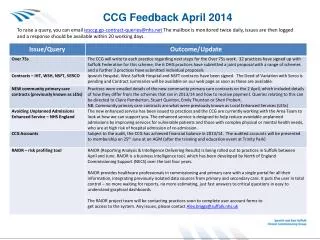
This document outlines the process for General Practitioners (GPs) to raise contractual queries with the Ipswich and East Suffolk CCG. GPs can email their queries to iesccg.gp-contract-queries@nhs.net, with the mailbox monitored twice daily. Responses are typically provided within 20 working days. Additionally, practices can stay updated through the Weekly Inbox newsletter and monthly training events, which are accessible via the GP practice member area on the CCG website. Registration is available for non-member practices.


Improving GP Contractual Queries: A Guide for Practices
E N D
Presentation Transcript
How Practices can Raise Contractual Queries • To raise a query, GPs can email iesccg.gp-contract-queries@nhs.net • The mailbox is monitored twice daily, issues are then logged and a response should be available within 20 working days. • How to receive updates • Via the Weekly Inbox newsletter – previous editions can be found on our website on www.ipswichandeastsuffolkccg.nhs.uk • Via monthly training events Hover mouse over ‘GP practice member area’ Click on ’Weekly Inbox’ Not a member? Register to join!