
SlideServe
Menu
Préférences
© SlideServe · v2026

BannerLink Custom Display Ad

Gabriel avatar
2 diapositives · 318 Views · Sep 12, 2011

BannerLink Custom Display Ad. Integrate Your Brand and Your Message into a BannerLink Banner.
BannerLink Custom Display Ad - slide 1
01 / 2BannerLink Custom Display Ad
1 / 17

Télécharger la présentation

BannerLink Custom Display Ad
Une image / un lien ci-dessous est fourni (tel quel) pour télécharger la présentation

Politique de téléchargement : le contenu du site vous est fourni TEL QUEL pour votre information et votre usage personnel ; il ne peut être vendu, concédé sous licence ni partagé sur d’autres sites sans l’accord de son auteur.Le contenu vous est fourni TEL QUEL, pour votre information et votre usage personnel uniquement. Téléchargez la présentation en cliquant sur ce lien. Lors du téléchargement, si vous ne parvenez pas à télécharger une présentation, l’éditeur a peut-être supprimé le fichier de son serveur.Pendant le téléchargement, si vous ne parvenez pas à obtenir une présentation, le fichier a peut-être été supprimé par l’éditeur.

F I N

Plus de contenu associé

Transcription de la présentation
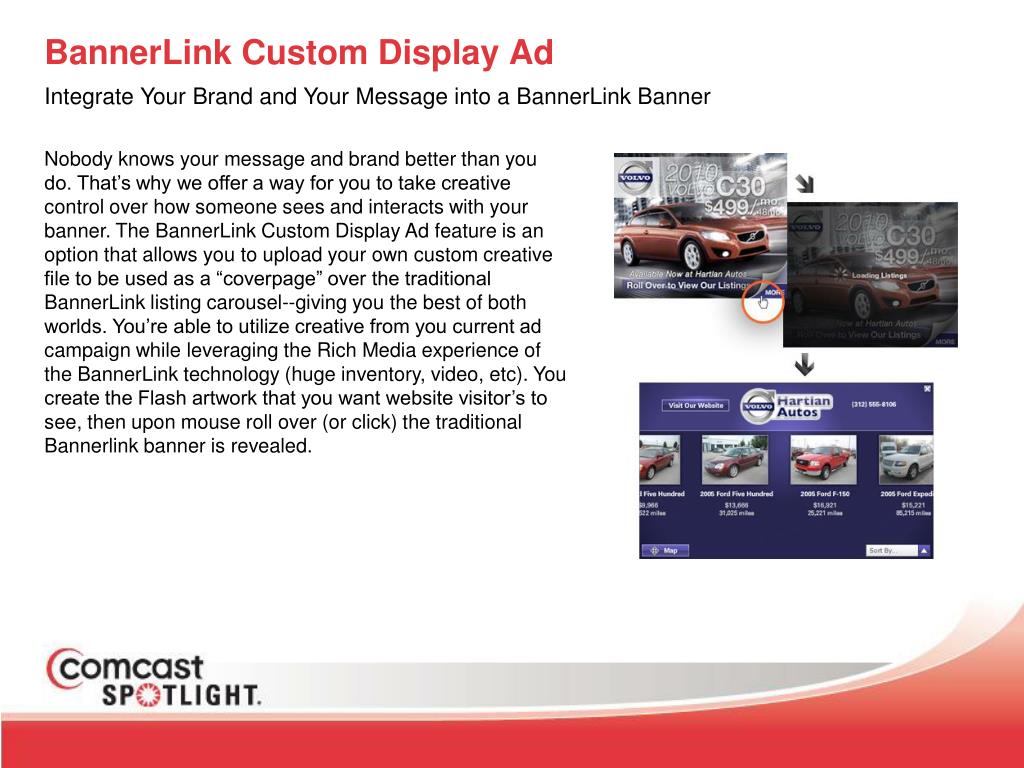
  1. BannerLink Custom Display Ad Integrate Your Brand and Your Message into a BannerLink Banner Nobody knows your message and brand better than you do. That’s why we offer a way for you to take creative control over how someone sees and interacts with your banner. The BannerLink Custom Display Ad feature is an option that allows you to upload your own custom creative file to be used as a “coverpage” over the traditional BannerLink listing carousel--giving you the best of both worlds. You’re able to utilize creative from you current ad campaign while leveraging the Rich Media experience of the BannerLink technology (huge inventory, video, etc). You create the Flash artwork that you want website visitor’s to see, then upon mouse roll over (or click) the traditional Bannerlink banner is revealed.

  2. BannerLink Custom Display Ad How Do I get Started? It’s easy! Your designer will need to download one of the Flash templates from www.liquidusbannerlink.com/Display-Ad.aspx This page not only provides the necessary template for the various banner sizes, but also includes the code snippets necessary to make your .SWF file trigger a banner. The most important requirement for your custom creative is that your .SWF file be under 40kb--any larger and it’ll exceed the IAB standards for file size (and won’t be able to be uploaded). Is Any Special Software Required? Yes, your designer will need to have Adobe Flash installed. Building a Custom Display Ad requires manipulating the artwork in the file and may require inserting a snippet of code. Questions? Contact: Jason Steele (312) 589-6123jsteele@liquidusmarketing.com