Introduction Tutorial How to publish the contents of a database using features available in Microsoft Windows Local machine Legacy client/server Intranet/Internet Introduction “Might be a little bit heavy on the VB/ HTML side for old-time capacity planners...” Vic Soder, CMG ERB
Une image / un lien ci-dessous est fourni (tel quel) pour télécharger la présentation
Politique de téléchargement : le contenu du site vous est fourni TEL QUEL pour votre information et votre usage personnel ; il ne peut être vendu, concédé sous licence ni partagé sur d’autres sites sans l’accord de son auteur.Le contenu vous est fourni TEL QUEL, pour votre information et votre usage personnel uniquement.Téléchargez la présentation en cliquant sur ce lien.Lors du téléchargement, si vous ne parvenez pas à télécharger une présentation, l’éditeur a peut-être supprimé le fichier de son serveur.Pendant le téléchargement, si vous ne parvenez pas à obtenir une présentation, le fichier a peut-être été supprimé par l’éditeur.
F I N
Plus de contenu associé
Transcription de la présentation
Introduction • Tutorial • How to publish the contents of a database using features available in Microsoft Windows • Local machine • Legacy client/server • Intranet/Internet
Introduction • “Might be a little bit heavy on the VB/ HTML side for old-time capacity planners...”Vic Soder, CMG ERB • If you have ever written a COBOL program, you are overqualified for web development.
Disclaimer • All products mentioned are the property of their owners • It may possible to use these technologies to publish data in ways that were not intended, or that have licensing implications
MDAC • Universal Data Access • ODBC – Open Database Connectivity • OLE DB – OLE Database • ADO – Active Data Objects • RDS – Remote Data Services • ADO.Net - ???
ODBC • Circa 1990 • Ubiquitous drivers • Not an Object-Oriented API • Relational bias
OLE DB • COM interface • Support for broader spectrum of data repositories • Interface used by ADO • ODBC data sources accessible via “MS OLE DB provider for ODBC” • Possibly with reduced function
ADO • (currently) Highest level interface • Simplified object structure • Relies on OLE DB
RDS • Makes ADO data sources accessible across a network • HTTP, HTTPS, or DCOM • Uses Microsoft Internet Information Server as conduit
ODBC Data Sources • Control Panel Administrative Tools Data Sources (ODBC) • SAS ODBC Drivers • System Data Source • TCP Portc:\WINNT\system32\drivers\etc\services
ODBC Separate install Full SQL support Runs Proc OdbcServ instance Field name is variable label OLE DB Auto install with V8 SQL not supported Direct lib/member access Field name is variable name SAS ODBC vs. OLE DB
MSDFMAP.ini • RDS Security • C:\WinNT\System\MSDFMAP.ini • Create token to identify local data source for remote access • Determine permitted access
MSDFMAP.ini [connect default]Access=NoAccess[sql default];Sql=" “ ' <---comment this line out[connect PDB]Access=ReadOnlyConnect="Provider=sas.LocalProvider.1; Data Source=d:\PDB\Detail\“[connect SasRemote]Access=ReadOnlyConnect="Data Source=SasLocal"
Other RDS/IIS Issues • IIS uses IWAM-servername as proxy (Launch IIS Process Account) • WQExxxxx.TRC diagnostics • Recommendations (SAS) • ODBC – Start Proc OdbcServ manually • OLE DB – give IWAM-servername read permission to PDB
Field Object • Fields collection contains Field objects, one for each column in the table • rs.Fields.Count – number of columns • rs.Fields(x).Value - value • rs.Fields(x).Name – label
ActiveX Objects • COM subroutines • Visible and not • Microsoft and not • ProgId (OWC.Spreadsheet) or ClassId“0002E510-0000-0000-C000-000000000046” • Create them • Read/write properties • Call methods • Handle events
ActiveX – No Script <HTML><OBJECT HEIGHT=500 WIDTH=100%classid=clsid:C4D2D8E0-D1DD-11CE-940F-008029004347></OBJECT></HTML> D:\Cmg2000\NoScript.htm
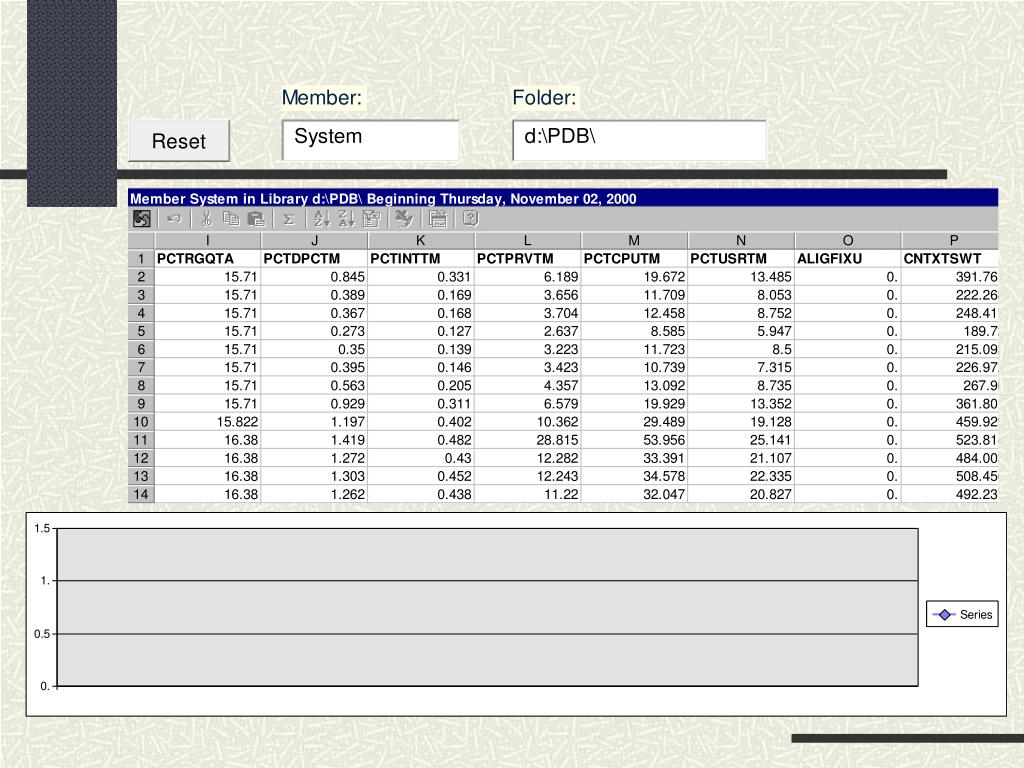
OWC Spreadsheet • Resembles Excel spreadsheet • Visible or not • Contains one or more Worksheets • Worksheets contain cells • spreadsheet.worksheet.Cell(row,col) • Single Worksheet then spreadsheet.Cell(row,col)
OWC Spreadsheet Range • Identifies a rectangular group of cells • Used by methods that operate on groups of cells • set Range = spreadsheet.Columns(x) • object.Range(TopLeft : BottomRight)
OWC Spreadsheet API • ss.ActiveSheet.UsedRange.Clear • ss.ViewableRange = ss.ActiveSheet.UsedRange.Address • ExcelStyleCellReference = ss.Columns(Columns).Address • Set c = ss.Constants Constants available at run-time
Populate Spreadsheetfrom RecordSet Row = 1While Not rs.EOF Col = 1 While Col <= rs.Fields.Countss.ActiveSheet.Cells(Row, Col).Value = rs.Fields(Col - 1).Value Col = Col + 1 Wend Row = Row + 1 rs.MoveNextWend
Populate Faster Set field = rs.FieldsSet cell = ss.ActiveSheet.CellsRow = 1While Not rs.EOF Col = 1 While Col <= rs.Fields.Countcell(Row, Col).Value = field(Col - 1).Name Col = Col + 1 Wend Row = Row + 1 rs.MoveNextWend
OWC Chart • General purpose charting functions • 45 chart types • ChartSpace - one or more charts • Careful with terminology • Series – points to be plotted as a group • Value axis is vertical (y) • Category axis is horizontal (x)
OWC Chart API • Set cs.DataSource = ss.Object Chart data will come from spreadsheet • Set chart = cs.Charts.Add() Add a chart to the chart space • cs.Clear Clear all charts in the chart space • Set c = cs.Constants Constants available at run-time
Connexion au compte
Connectez-vous pour publier votre contenu sur SlideServe.