Exploring Java Programming: Mouse Events, Variables, and Random Number Generation
160 likes | 290 Vues
This guide delves into key Java programming concepts including mouse events, variable usage, and random number generation. Learn how to access and manipulate unknown information through unpredictable actions, like dragging an object vertically or generating random dice rolls. Discover how to utilize accessor methods to retrieve object data and implement variable assignment, constants, and arithmetic operations. Throughout the tutorial, we focus on expressions versus statements, enhancing your Java programming skills effectively. Start creating dynamic and interactive applications today!


Exploring Java Programming: Mouse Events, Variables, and Random Number Generation
E N D
Presentation Transcript
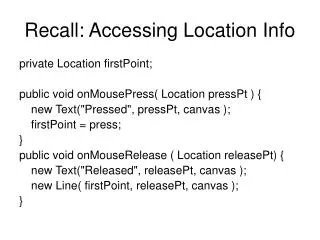
Recall: Accessing Location Info private Location firstPoint; public void onMousePress( Location pressPt ) { new Text("Pressed", pressPt, canvas ); firstPoint = press; } public void onMouseRelease ( Location releasePt) { new Text("Released", releasePt, canvas ); new Line( firstPoint, releasePt, canvas ); }
Being Unpredictable • Formal parameters: • allow us to refer to information that is unknown when the program is written • Are there other ways we access and use “unknown” information?
The Highs and Lows • What if we want to move an object only vertically by dragging the mouse? Pong: public void onMouseDrag( Location mousePos ) { paddle.moveTo( 10, mousePos.getY() ); }
Accessor Methods • Methods that return information about an object • Examples: mousePos.getY(); canvas.getWidth();
Expressions vs Statements • Statements: • “Top of the morning to you.” • paddle.moveTo(10,mousePos.getY() ); Perform a useful action • Expressions: • “the morning” • mousePos.getY() Used in statements
Fun with Numbers • initialPosition.getX() and -5 are both numbers • Can add, subtract, divide, multiply numbers • initialPosition.getX() + 5 • 5 - initialPosition.getX() • initialPosition.getX() / 5 • initialPosition.getY() * 3
Order of Arithmetic Operations 2 + (initialPosition.getX() – initialPosition.getY()) * 5 • Precedence Rules: • Perform operations within parentheses first • Divisions and multiplications before additions and subtractions • Operations of equal precedence performed left to right
Instance Variables • We can give names to numeric values as we can name objects private int brightness; //shade of gray brightness = 50;
Using Variables • First declare: private int brightness; private Color purple; • Then initialize brightness = 50; purple = new Color( 255, 0, 255 ); • We can also reassign values to variables brightness = 34; Unless…
Using Constants private static final int BRIGHTNESS = 255; • The keyword final indicates we cannot reassign a new value to brightness • The Java convention for naming constants is all caps
Displaying Numeric Information • We can combine numbers and text for display Text countDisplay; int programNum = 3; countDisplay = new Text("This is program #" + programNum, …);
System.out.println • Two ways to display textual information • Text class • System.out.println(…); • System.out.println("Number " + 5 ); • prints Number 5 to the Java Console
Playing Dice with the Universe • How can we simulate a roll of dice? • Through random numbers!
Random Numbers RandomIntGenerator die; die = new RandomIntGenerator( 1, 6 ); //display a random integer between 1 and 6 System.out.println( die.nextValue() );
public class RollAnotherOne extends WindowController { private static final int NUM_SIDES = 6; private RandomIntGenerator die = new RandomIntGenerator ( 1, NUM_SIDES ); public void begin() { new Text("Click to make me roll the dice ", TEXT_X, PROMPT_Y, canvas ); } public void onMouseClick (Location point ){ roll1 = die.nextValue(); roll2 = die.nextValue(); System.out.println("You rolled a " + roll1 + "and a " + roll2 + " for a total of " + ( roll1 + roll2 ) ); } }
Review • Numbers • Expressions and statements • Variables and Constants • System.out.println(…) • Generating random numbers