
Uploaded by
bo-reeves
1 SLIDES
133 VUES
10LIKES
Understanding Computer Hardware: BIOS, RAM, and Mainboard Installation
DESCRIPTION
This guide explores the essential components of a computer, focusing on the BIOS, RAM, and mainboard installation. Learn how to locate your BIOS settings, understand the significance of RAM in system performance, and ensure your mainboard is correctly installed for optimal functionality. We'll also discuss qualifications for hardware upgrades and troubleshooting tips to enhance your computer's performance. Whether you're a beginner or an experienced user, this information will help demystify hardware configurations and improve your tech knowledge.
Download
1 / 1
Télécharger la présentation 
Understanding Computer Hardware: BIOS, RAM, and Mainboard Installation
An Image/Link below is provided (as is) to download presentation
Download Policy: Content on the Website is provided to you AS IS for your information and personal use and may not be sold / licensed / shared on other websites without getting consent from its author.
Content is provided to you AS IS for your information and personal use only.
Download presentation by click this link.
While downloading, if for some reason you are not able to download a presentation, the publisher may have deleted the file from their server.
During download, if you can't get a presentation, the file might be deleted by the publisher.
E N D
Presentation Transcript
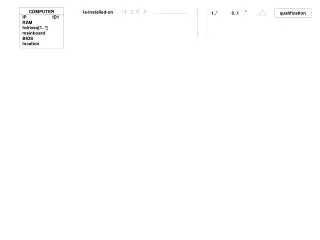
COMPUTER IP ID1 RAM hdrives[1..*] mainboard BIOS location Is-installed-on * 1..* 0..1 qualification

















More Related