Programming and Connecting FEM-IB Board Using Xilinx ISE Design Suite
This guide provides step-by-step instructions for connecting and programming the FEM-IB board using the Xilinx ISE Design Suite 13.1. It details how to connect the programmer to the board, initialize the programmer, and configure the device within the iMPACT tool. Key steps include setting orientation of connectors, selecting appropriate project files, and programming the device while ensuring correct connections. Follow these steps carefully to avoid errors and successfully complete the programming process.

Programming and Connecting FEM-IB Board Using Xilinx ISE Design Suite
E N D
Presentation Transcript
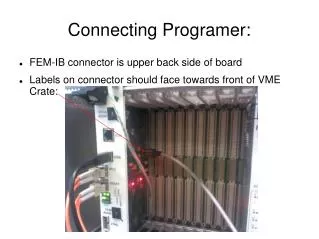
Connecting Programer: • FEM-IB connector is upper back side of board • Labels on connector should face towards front of VME Crate:
Connecting Programer: • FEM connector is top side of board • Labels on connector should face towards bottom of VME Crate:
Initialzing Programmer • Under “All Programs” open Xilinx ISE Design Suite 13.1 -> Lab Tools -> Impact • Answer “No” to Automatically Create and Save Box:
Initialzing Programmer • In drop down box: • For FEM-IB board select FEM_IB.ipf • For FEM board select FEM.ipf • Enter OK
You should see 2 devices for FEM-IB and 4 for FEM board FEM-IB FEM
Checks • Click on device • Right click and select “Get Device ID” • Should get “ReadIdcode Succeded” • If failure, then cable is backwards. Correct and repeat. • Close window, answer “NO” to “Save Project”
To Program • Locate Main project file for FPGA to be programed and double click it • For the FEM-IB
To Program • Answer “Yes” when windows gives the warning message. • The Xilinx package should open (Slide 9) • Scroll down to find the Configure Device (iMPACT) option and double click • A new iMPACT window should appear (Slide 10) • Select device to be programed (xcf02s) for the FEM-IB, left click to highlight and right click to get menu. • Select program. Take default options and click on OK button • Wait for operation to complete 30-60 seconds depending on device