Advanced Processing Techniques for LAC/HRPT Raw Data Calibration and Georeferencing
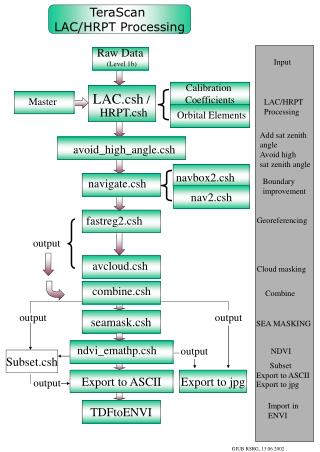
This document outlines the methodologies and scripts utilized in the processing of Level 1B LAC/HRPT raw data. It includes calibration coefficients, handling of orbital elements, and techniques for avoiding high satellite zenith angles. Key processes such as georeferencing, cloud masking, and output generation to various formats (ASCII, JPG) are highlighted. Additionally, advancements in boundary improvement and NDVI calculations are presented, showcasing a comprehensive approach to remote sensing data management. The goal is to enhance data accuracy for scientific applications.

Advanced Processing Techniques for LAC/HRPT Raw Data Calibration and Georeferencing
E N D
Presentation Transcript
TeraScan LAC/HRPT Processing Raw Data (Level 1b) Input Calibration Coefficients LAC.csh / Master LAC/HRPT Processing HRPT.csh Orbital Elements Add sat zenith angle Avoid high sat zenith angle avoid_high_angle.csh navbox2.csh navigate.csh Boundary improvement nav2.csh fastreg2.csh Georeferencing output avcloud.csh Cloud masking combine.csh Combine output output seamask.csh SEA MASKING ndvi_emathp.csh output NDVI Subset.csh Subset Export to ASCII Export to ASCII Export to jpg output Export to jpg Import in ENVI TDFtoENVI GIUB RSRG, 13.06.2002