
Essential PowerPoint Shortcuts for Efficient Slide Editing and Presentation Management
E N D
Presentation Transcript
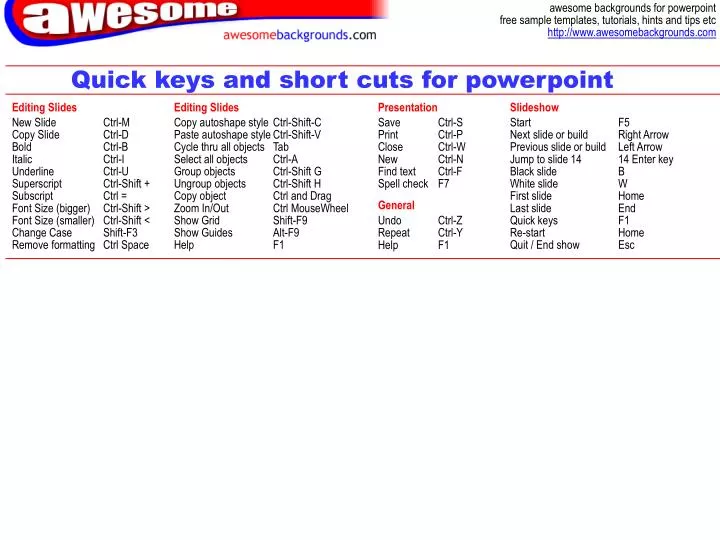
Quick keys and short cuts for powerpoint Editing Slides Editing Slides Presentation Slideshow New Slide Copy Slide Bold Italic Underline Superscript Subscript Font Size (bigger) Font Size (smaller) Change Case Remove formatting Ctrl-M Ctrl-D Ctrl-B Ctrl-I Ctrl-U Ctrl-Shift + Ctrl = Ctrl-Shift > Ctrl-Shift < Shift-F3 Ctrl Space Copy autoshape style Paste autoshape style Cycle thru all objects Select all objects Group objects Ungroup objects Copy object Zoom In/Out Show Grid Show Guides Help Ctrl-Shift-C Ctrl-Shift-V Tab Ctrl-A Ctrl-Shift G Ctrl-Shift H Ctrl and Drag Ctrl MouseWheel Shift-F9 Alt-F9 F1 Save Print Close New Find text Spell check Ctrl-S Ctrl-P Ctrl-W Ctrl-N Ctrl-F F7 Start Next slide or build Previous slide or build Jump to slide 14 Black slide White slide First slide Last slide Quick keys Re-start Quit / End show F5 Right Arrow Left Arrow 14 Enter key B W Home End F1 Home Esc General Undo Repeat Help Ctrl-Z Ctrl-Y F1