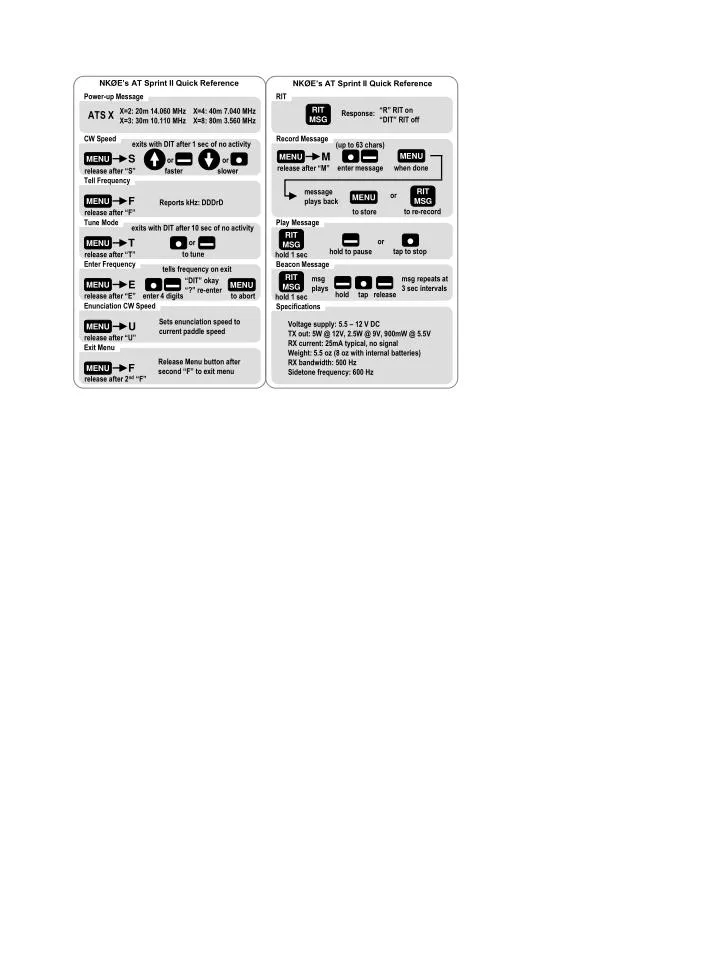

AT Sprint II Quick Reference Guide
E N D
Presentation Transcript
Power-up Message CW Speed exits with DIT after 1 sec of no activity X=2: 20m 14.060 MHz X=3: 30m 10.110 MHz X=4: 40m 7.040 MHz X=8: 80m 3.560 MHz ATS X S MENU ▬ ● or or release after “S” faster slower Record Message (up to 63 chars) MENU M ● ▬ MENU enter message when done release after “M” Tell Frequency RIT RIT MSG message plays back RIT MSG “R” RIT on “DIT” RIT off or MENU Response: F MENU Reports kHz: DDDrD to re-record to store release after “F” Tune Mode Play Message exits with DIT after 10 sec of no activity RIT MSG ▬ ● T MENU ● ▬ or or tap to stop hold to pause to tune release after “T” hold 1 sec Beacon Message Enter Frequency Enunciation CW Speed tells frequency on exit RIT MSG msg plays msg repeats at 3 sec intervals “DIT” okay “?” re-enter Sets enunciation speed to current paddle speed ▬ ● ▬ E MENU ● ▬ MENU U MENU hold tap release release after “E” enter 4 digits to abort hold 1 sec release after “U” Specifications Exit Menu Voltage supply: 5.5 – 12 V DC TX out: 5W @ 12V, 2.5W @ 9V, 900mW @ 5.5V RX current: 25mA typical, no signal Weight: 5.5 oz (8 oz with internal batteries) RX bandwidth: 500 Hz Sidetone frequency: 600 Hz Release Menu button after second “F” to exit menu F MENU release after 2nd “F” NKØE’s AT Sprint II Quick Reference NKØE’s AT Sprint II Quick Reference