Recursive and Iterative Approaches to Sum, Power, Fibonacci, and Sierpinski Triangle
Explore both recursive and iterative methods for computing sums, powers, and Fibonacci numbers, as well as the Sierpinski triangle application. The provided code examples demonstrate how to calculate the sum of integers from 1 to n, compute b raised to the power of n, and generate Fibonacci numbers using both recursion and iteration. Additionally, learn how to create Sierpinski triangles utilizing recursion for efficient visualization in programming. Ideal for students and developers looking to understand these concepts in depth.

Recursive and Iterative Approaches to Sum, Power, Fibonacci, and Sierpinski Triangle
E N D
Presentation Transcript
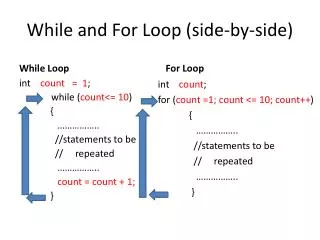
Side-by-side View while loop recursion
Compute the sum 1 + 2 + 3 +...+ n int sum(int n) { if (n == 1) { return 1; } else { return n + sum(n-1); } } int sum(int n) { int total = 0; int i = 1; while (i <= n) { total = total + i; i = i + 1; } return total; }
Compute b^n double power(double b, int n) { double result = 1; int i = 0; while (i < n) { result = result * b; i = i + 1; } return result; } double power(double b, int n) { if (n == 0) { return 1; } else { return b*power(b, n-1); } }
Compute the n-th Fibonacci number (0, 1, 1, 2, 3, 5, 8, ...) int fibonacci(int n) { if (n == 1) { return 0; } else if (n == 2) { return 1; } else { return fibonacci(n-1) + fibonacci(n-2); } } int fibonacci(int n) { int i = 1; int curFib = 0; int nextFib = 1; while (i < n) { int newCur = nextFib; int newNext = curFib + nextFib; curFib = newCur; nextFib = newNext; i = i + 1; } return curFib; }
void drawCirclesRow(double x, double y, double radius, int n) { double curX = x; double curY = y; int count = 0; while ( count < n ) { canvas.drawCircle(curX, curY, radius); curX = curX + 2*radius; count = count + 1; } } void drawCirclesRow(double x, double y, double radius, int n) { if (n > 0) { canvas.drawCircle(x, y, radius); drawCirclesRow(x+2*radius, y, radius, n-1); } }
int binarySearch(int[] array, int value) { code from homework 10 }
int binarySearch(int[] array, int value) { code from homework 10 } int binarySearch(int[] array, int value, int i, int j) { if (i > j) { return -1; } else { int m = (i + j) / 2; if (array[m] == value) { return m; } else if (array[m] < value) { return binarySearch(array, value, m+1, j); } else // value < array[m] { return binarySearch(array, value, i, m-1); } } }
void drawSierpinski(double x1, double y1, // lower-left vertex double x2, double y2, // lower-right vertex double x3, double y3, // top vertex int depth) { MUCH EASIER TO DO WITH RECURSION (NO WHILE LOOP VERSION in CS 111) }
void drawSierpinski(double x1, double y1, // lower-left vertex double x2, double y2, // lower-right vertex double x3, double y3, // top vertex int depth) { MUCH EASIER TO DO WITH RECURSION (NO WHILE LOOP VERSION in CS 111) } void drawSierpinski(double x1, double y1, // lower-left vertex double x2, double y2, // lower-right vertex double x3, double y3, // top vertex int depth) { if (depth > 0) { // calculate the mid points of the sides double x12 = (x1 + x2) / 2; double y12 = (y1 + y2) / 2; double x13 = (x1 + x3) / 2; double y13 = (y1 + y3) / 2; double x23 = (x2 + x3) / 2; double y23 = (y2 + y3) / 2; // draw base triangle and “remove” middle section canvas.drawTriangle(x1, y1, x2, y2, x3, y3, "black"); canvas.drawTriangle(x12, y12, x23, y23, x13, y13, "white"); canvas.sleep(1); // draw lower-left, lower-right, top portion (in this order) drawSierpinski(x1, y1, x12, y12, x13, y13, depth-1); drawSierpinski(x12, y12, x2, y2, x23, y23, depth-1); drawSierpinski(x13, y13, x23, y23, x3, y3, depth-1); } }