Access to Event Object
This guide covers how to implement draggable elements in an HTML document using JavaScript. By utilizing event handling methods for mouse events (mousedown, mousemove, mouseup), we create a draggable rectangle feature. The provided code showcases how to track mouse movements and update an element's position dynamically while dragging. It explains the role of global and event-specific variables in different browsers, providing a comprehensive understanding for students in CS 142. Learn the intricacies of event handling and object manipulation in the DOM.

Access to Event Object
E N D
Presentation Transcript
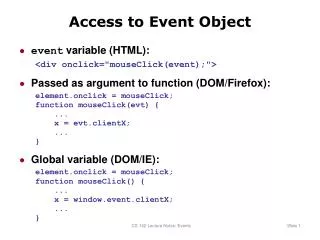
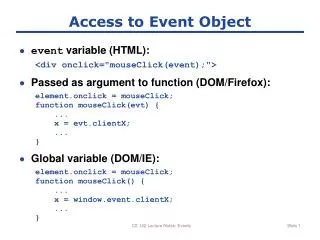
Access to Event Object • event variable (HTML): <div onclick="mouseClick(event);"> • Passed as argument to function (DOM/Firefox): element.onclick = mouseClick; function mouseClick(evt) { ... x = evt.clientX; ... } • Global variable (DOM/IE): element.onclick = mouseClick; function mouseClick() { ... x = window.event.clientX; ... } CS 142 Lecture Notes: Events
Draggable Rectangle <style type="text/css"> #div1 { position: absolute; } </style> ... <div id="div1" onmousedown="mouseDown(event);" onmousemove="mouseMove(event);" onmouseup="mouseUp(event);">Drag Me!</div> CS 142 Lecture Notes: Events
Dragging Application isMouseDown = false; function mouseDown(event) { prevX = event.clientX; prevY = event.clientY; isMouseDown = true; } function mouseMove(event) { if (!isMouseDown) { return; } var element = document.getElementById("div1"); element.style.left = (element.offsetLeft + (event.clientX - prevX)) + "px"; element.style.top = (element.offsetTop + (event.clientY - prevY)) + "px"; prevX = event.clientX; prevY = event.clientY; } function mouseUp(event) { isMouseDown = false; }
Cleaner Implementation <body> <div id="div1">Drag Me!</div> <div id="div2">Drag Me Too!</div> <script type="text/javascript" src="dragger.js" /> <script type="text/javascript"> //<![CDATA[ new Dragger("div1"); new Dragger("div2"); //]]> </script> </body>} CS 142 Lecture Notes: Events
Dragger.js, part 1 function Dragger(id) { this.isMouseDown = false; this.element = document.getElementById(id); varobj = this; this.element.onmousedown = function(event) { obj.mouseDown(event); } } Dragger.prototype.mouseDown= function(event) { varobj = this; this.oldMoveHandler = document.body.onmousemove; document.body.onmousemove= function(event) { obj.mouseMove(event); } this.oldUpHandler = document.body.onmouseup; document.body.onmouseup= function(event) { obj.mouseUp(event); } this.prevX= event.clientX; this.prevY = event.clientY; this.isMouseDown = true; } CS 142 Lecture Notes: Events
Dragger.js, part 2 Dragger.prototype.mouseMove = function(event) { if (!this.isMouseDown) { return; } this.element.style.left = (this.element.offsetLeft + (event.clientX - this.prevX)) + "px"; this.element.style.top = (this.element.offsetTop + (event.clientY - this.prevY)) + "px"; this.prevX = event.clientX; this.prevY = event.clientY; } Dragger.prototype.mouseUp = function(event) { this.isMouseDown = false; document.body.onmousemove= this.oldMoveHandler; document.body.onmouseup= this.oldUpHandler; } CS 142 Lecture Notes: Events
Which Element Gets Event? <body> <table> <tr> <td>xyz</td> </tr> </table> </body> Click on this CS 142 Lecture Notes: Events