Enhancing Collaboration and Project Management with Microsoft SharePoint in Education
Discover how Microsoft SharePoint can transform documentation, collaboration, and project management within educational institutions like Pajaro Valley Unified School District. With a focus on staff development and technology services, SharePoint provides secure, web-based solutions for document management, enabling organized access to essential information. Explore features such as indexed searches, email integration, and customizable templates that streamline everyday tasks. Additionally, learn about potential challenges and best practices to optimize the use of SharePoint for effective team collaboration and communication.

Enhancing Collaboration and Project Management with Microsoft SharePoint in Education
E N D
Presentation Transcript
Microsoft SharePoint for Collaboration, Documentation and Project Management
About Me • Assistant Director of Technology Services for Pajaro Valley Unified School District • Staff Development Coordinator/Coach • Network Technician • Computer Teacher • Bilingual Classroom Teacher
Technology Services Documentation History • Staff members maintained own files on their computers-very little collaboration • Important documents saved in various server shares
Documentation Wiki • Pros • Central Location for information • Web based • Password protected • versioning • Cons • no granulated access • Not secure • More like an online argument not real collaboration • Wysiwyg frustration • Convert documents to web
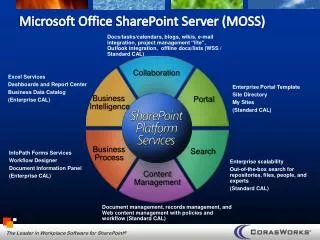
MOSS 2007 Pros • Easy to setup and learn • Configurable templates and tools • Integrates with AD • Security- Access Control/Permissions • Email integration • Web Based- Intranet • Indexed Searches • MS Office integration • Lots of collaboration tools • Great Document Management
Our Documentation Site Tour • Home Page • Agendas and Minutes • Contacts • Vacation Calendar • Agenda builder • Documentation Home • Distribution List Archive • Discussion • Tech Shots • Contact Lists • What’s New • Advanced Search • Pages
Erate Documentation • Secure Documentation • Granulated Access • RFP collaboration • Email and Email Archive • Telephone Log • Indexed Searches • Erate Audit
Project Management • Outlook Integration • Shared Calendars • Shared Task Lists with Workflows • Shared Contacts • Project Documents • Link to Documentation sites • Email
Technology Liaison Site (Instructional Collaboration) • Collaboration Web Parts • Permissions • Power Point Slide Library • Document Library • Pictures • Instructional Links • Videos • Distribution List Archive • Surveys
SharePoint Features and SettingsDocument Libraries • Upload multiple • Open with Windows Explorer • Connect to Outlook • Email attach and Alert • Permissions and Groups • Windows Explorer • Zip List • Views
SharePoint Features and SettingsMy Site • My Documents • Personal Document Library • People Search • Social Network • My Links • Blogs
SharePoint Features and SettingsSite Actions • Create • Web Page • Web Part • Libraries • Edit • Add or Remove Web Parts • Arrange or Move Web Parts • Modify individual Web Parts • Site Settings • Users and Permissions • Look and Feel • Galleries • Site Administration
SharePoint Advice • Less is more • Search for Templates and Tools someone somewhere probably already invented the wheel • SharePoint Backup issues • Get help on scaling for number of users • Plan on large amount of growth • Keep growth in mind when creating site architecture • Be careful with global settings • Create another site to try out things before implementing in your working site