Password Synchronization Procedure for Internet Garden Access After Expiry
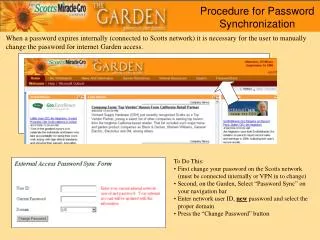
When a password expires on the Scotts network, users must manually change it for Internet Garden access. To do this, first, change your password on the Scotts network, ensuring you are connected internally or via VPN. Next, access the Garden and select “Password Sync” from the navigation bar. Enter your network user ID, the new password, and select the appropriate domain. Finally, click on the “Change Password” button to complete the synchronization process.

Password Synchronization Procedure for Internet Garden Access After Expiry
E N D
Presentation Transcript
Procedure for Password Synchronization When a password expires internally (connected to Scotts network) it is necessary for the user to manually change the password for internet Garden access. • To Do This: • First change your password on the Scotts network (must be connected internally or VPN in to change) • Second, on the Garden, Select “Password Sync” on your navigation bar • Enter network user ID, new password and select the proper domain • Press the “Change Password” button