1 / 5

How to Register Your Key for Auction Using DSC

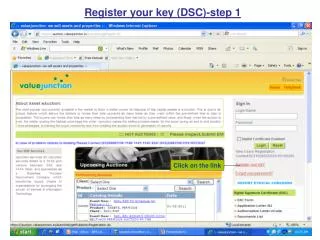
This guide will walk you through the steps to register your key for auction using Digital Signature Certificate (DSC). Follow these simple steps: 1. Click on the provided registration link. 2. Enter your login name and password, then click on "Submit." 3. Select your key from the list and click "OK." Be patient and do not click anywhere else during the process. Once completed, your key will be successfully registered for the auction.

gordy
Télécharger la présentation

How to Register Your Key for Auction Using DSC

An Image/Link below is provided (as is) to download presentation Download Policy: Content on the Website is provided to you AS IS for your information and personal use and may not be sold / licensed / shared on other websites without getting consent from its author. Content is provided to you AS IS for your information and personal use only. Download presentation by click this link. While downloading, if for some reason you are not able to download a presentation, the publisher may have deleted the file from their server. During download, if you can't get a presentation, the file might be deleted by the publisher.

E N D

Presentation Transcript


  1. Register your key (DSC)-step 1 Click on the link

  2. Register your key (DSC)-step 2 Write login name & password Click on submit

  3. Register your key (DSC)-step 3 Select your key & click on OK

  4. Wait for a moment do not click anywhere

  5. Your key has been registered for auction

More Related