Understanding Input, Output, and Error Redirection in File Handling
Learn how to redirect inputs, outputs, and errors in file handling through examples and techniques in different scenarios.

Understanding Input, Output, and Error Redirection in File Handling
E N D
Presentation Transcript
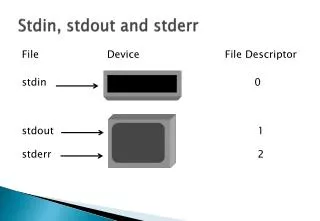
Stdin, stdout and stderr File Device File Descriptor stdin 0 stdout 1 stderr 2
< - Redirecting Inputs Any redirection that reads its input from stdin can have its input redirected to come from another file. Example $ cat remind Your mother’s birthday is November 5. $ mail user3 < remind $ mail From user3 Mon July 15 11:30 EDT 1993 Your mother’s birthday is November 5. Enter Enter Enter
> And >> - Redirecting Output Any command that produces output to stdout can have its output redirected to another file. Example $ date > date.out $ who > date.out $ who >> who.log $ ls >> who.log Enter Enter Enter Enter
2> and 2>> - Redirecting Errors Any command that produces error messages to stderr can have those messages redirected to another file. Example $ cp 2> cp.err $ cp 2>> cp.err $ cat cp.err Enter Enter Enter