Download
1 / 14
140 likes | 257 Vues
Join Matt Harrison from Portland College and Lisa Featherstone from Jisc TechDis for an interactive session on utilizing tablets for enhanced learning experiences. Discover the benefits of tablet devices, including accessibility and collaboration. We’ll explore essential apps for various learning needs, including speech and language support, productivity tools, and visual impairment resources. This hands-on session encourages participation, allowing attendees to experience tablet functionalities and applications firsthand. Let’s make learning engaging and accessible through technology!

E N D
Keep Taking the Tablets Matt Harrison – Portland College Lisa Featherstone – Jisc TechDis
Interactive Session If we talk too long – please feel free to remind us – we want this to be interactive and practical!
Programme • Tablets – what do we mean? • Introduction to accessibility • Apps • Fun stuff
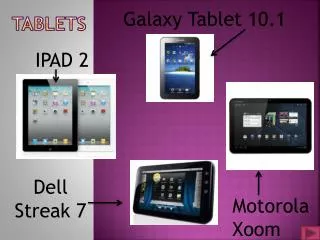
Tablet Devices Tablets are intuitive, simplified, picture based self contained tools for learning. Doing what technology does best, supporting personalisation and collaboration and not requiring specialist skills.
Tablet advantages • Accessible • Collaborative • Sensory • Multi media • Entertaining
Accessibility • iOS demonstration of access features • iOS hands on experience • Guided Access • Android accessibility (possibly)
Apps • What are they • Why are they so popular • What can they do • How to find you way in the App Jungle?
Visual Impairment Apps • Text for £6.98 – Matt • What colour? • How much? • Photography for the blind
Speech and Language Support • Speech and sound production – recommend to be used with SLT advice • Grammar – Sentence, preposition, story builder • Descriptive language • Stories
Productivity • Evernote • Mind mapping • Task management – Wunderlistetc • Calendars
AAT Apps • MyTalkTools • MyChoicePad • ProLoquo2Go • SonoFlex
Time to Play • Please choose one station and trial the different types of apps available. • We will be on hand to help and support
Questions MHarrison@portland.ac.uk lisa@techdis.ac.uk @notlob helpdesk@techdis.ac.uk