
Managing and Analyzing Arrays: Input, Output, and Arithmetic Operations in C++
E N D
Presentation Transcript
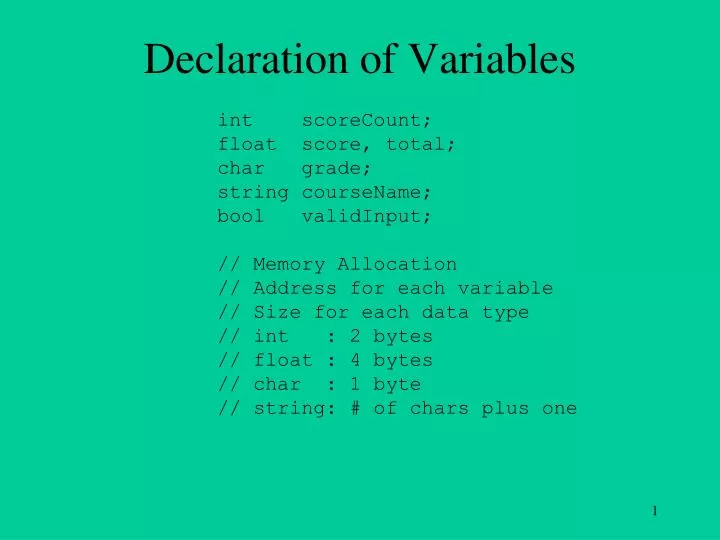
Declaration of Variables int scoreCount; float score, total; char grade; string courseName; bool validInput; // Memory Allocation // Address for each variable // Size for each data type // int : 2 bytes // float : 4 bytes // char : 1 byte // string: # of chars plus one
Computing Highest, Lowest, Average float score; float total, max, min, avg; int scoreCount; // Using one variable to input and process scores // One score at a time // When do we need to keep all scores? // Is my score below or above the average? // How do we keep all scores? // Array!
Declaration of Arrays float scores[100]; // 100 floats char chs[20]; // 20 chars int nums[30]; // 30 integers string allNames[100]; // 100 strings bool prog3Completed[26]; // 26 bool values
Memory Allocation for Array int nums[30]; // 30 integers // Address: the first element // How many bytes? // 30 * 2: 60 bytes nums
Array Size Must Be Constant Expressions const int MAX_SIZE = 30; int size = 30; int nums[30]; float ArrayA[MAX_SIZE]; // Valid? // Yes! // number of bytes? float ArrayB[size]; // Valid? // NO! float ArrayC[MAX_SIZE * 10]; //Valid? // Yes! // number of bytes?
Array Index and Array Element • How to access array elements? • Use array index to specify array element • Index of any array begins with 0
Array Element and Array Index int nums[30]; Array Element 0 1 2 3 28 29 Array Indices Array Element nums[0] nums[1] nums[29]
Operations on Array Elements • An array element is the same as a single variable • Operations on array elements: Input Output Arithmetic operations Assignment Comparison Function parameters …
int nums[30]; // Read an integer and store it in the 1st element of nums. cin >> nums[0]; // Incement the 1st element of nums by one. nums[0] ++; // Assign the value of the 1st element of nums to // the 2nd element of nums. nums[1] = nums[0]; // Incement the 2nd element of nums by the value of size. nums[1] += size; // Set the last element of nums to the value of size. nums[29] = size; // Assign the value of the 16th element of nums to size. size = nums[15];
int nums[30]; // Display 1st element of nums with a width of 9. cout << endl << setw(9) << nums[0]; // Compute the average of the 1st and last elements of // nums and store it in avg. avg = (nums[0] + nums[29]) / 2.0; // If the 2nd element is not zero, display the float // quotient of 1st element divided by 2nd. if (nums[1] != 0) cout << "Quotient = " << float(nums[0]) / nums[1]; // Call function Largest to find the max value between // the first three elments of nums and store it in Max. // Function prototype: // int Largest(int num1, int num2, int num3); Max = Largest(nums[0], nums[1], nums[2]);
const int MAX_SIZE = 30; int nums[MAX_SIZE], index; cin >> nums[29]; // Valid? cin >> nums[30]; // Valid? cout << nums[MAX_SIZE - 1]; // Valid? cout << nums[MAX_SIZE]; // Valid? cin >> index; if (index < MAX_SIZE && index >= 0) nums[index] = nums[10];
Initializing Arrays in Declarations int agae[5] = {23, 19, 33, 45, 60}; float temperature[] = {0.0, 112.37, -12, 98.6}; // May not working in HiC
Input n Numbers to an Array int ArrayA[30]; cin >> ArrayA[0]; cin >> ArrayA[1]; cin >> ArrayA[2]; cin >> ArrayA[3]; ... cin >> ArrayA[29]; cin >> ArrayA[30]; // OK?
Use while Loop to Process Array const int MAX_SIZE = 30; int ArrayA[MAX_SIZE]; int size = 20; int index = 0; // Loop 20 times while (index < size) { cin >> ArrayA[index]; index ++; } //Count-Controlled Loop
Use For Loops to Process Arrays cin >> size; // Assume in the range // Input to an array int i = 0; while (i < size) { cin >> ArrayA[i]; ++ i; } // Four parts of a loop! cin >> size; // Assume size in the range // Input to an array for (int i = 0; i < size; i ++) cin >> ArrayA[i]; // Same as while loop // Must Use For Loops for Arrays!
Use For Loops to Process Arrays Initialize Test // Must use For loop for arrays! for (int i = 0; i < size; i ++) cin >> ArrayA[i]; How many times is the body executed? size times! (Zero times if size <= 0) Body Update
Use For Loops to Process Arrays int ArrayA[30], size, j; cin >> size; // Assume size is between 1 and 30 // Input to an array for (int i = 0; i < size; i ++) cin >> ArrayA[i]; // Output array for (j = 0; j < size; j ++) cout << endl << setw(8) << ArrayA[j];
Use For Loops to Process Arrays int ArrayA[30], size, j; cin >> size; for (int i = 0; i < size; i ++) cin >> ArrayA[i]; // Compute total , max, min // The range is known. int min = 60; int max = 0; int total = 0; for (j = 0; j < size; j ++) { total += ArrayA[j]; if (ArrayA[j] > max) max = ArrayA[j]; if (ArrayA[j] < min) min = ArrayA[j]; }
Use For Loops to Process Arrays int ArrayA[30], size; cin >> size; for (int i = 0; i < size; i ++) cin >> ArrayA[i]; // Compute total , max, min // The range is NOT known. // size > 0 and size <= 30 int min = ArrayA[0]; int max = ArrayA[0]; int total = ArrayA[0]; for (int j = 1; j < size; j ++) { total += ArrayA[j]; if (ArrayA[j] > max) max = ArrayA[j]; if (ArrayA[j] < min) min = ArrayA[j]; }
Never go out of the range of an array const int MAX_SIZE = 30; int ArrayA[MAX_SIZE]; for (int i = 1; i <= MAX_SIZE; i ++) cin >> ArrayA[i]; // Out of Range! 0 1 2 3 28 29
Schedule Drop your Prog3.cpp to S:\Courses\CSSE\yangq\CS1430\Prog3 Quiz5-1 (1 point) Due: 5 PM Wednesday Program 3 Due 9:30 PM Wednesday, March 23