EasyBib: Your Ultimate Citation and Research Management Tool
50 likes | 176 Vues
Learn how to create an account on EasyBib and start managing your research projects efficiently. Visit www.easybib.com, click on “Sign up,” and enter your unique coupon code sparrowspoinths2014. After registration, easily log in with your email and password. Discover how to create citations in MLA, APA, and Chicago/Turabian styles. Utilize the Notebook feature to organize your research, create virtual notecards, and build outlines. Tag, color-code, and structure your notes for easy retrieval, enhancing your research process.


EasyBib: Your Ultimate Citation and Research Management Tool
E N D
Presentation Transcript
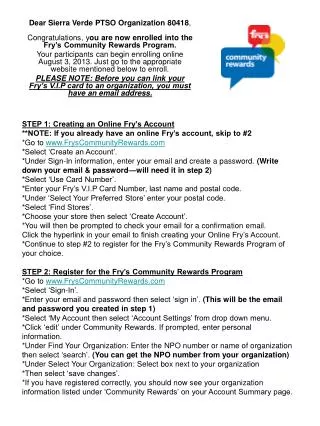
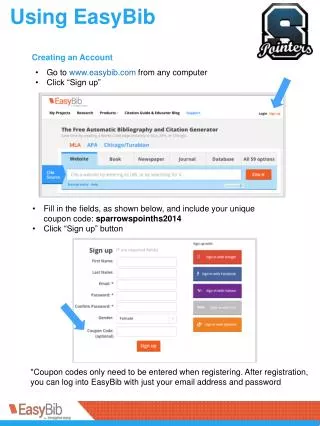
Creating an Account • Go to www.easybib.com from any computer • Click “Sign up” • Fill in the fields, as shown below, and include your unique coupon code: sparrowspoinths2014 • Click “Sign up” button *Coupon codes only need to be entered when registering. After registration, you can log into EasyBib with just your email address and password
Creating A Project • To get started, click on “My Projects” • Create a new project, then click on “Bibliography” to start citing your sources.
Citation Basics • Why do we cite? • To give credit to those authors who contributed information to your research. • To make arguments more credible. • To show that you have found credible and relevant sources. • To help readers find your sources. • Citation Styles • EasyBib has 3 citation styles: MLA, APA, and Chicago/Turabian. Ask your instructor which style you should use for your research project. *No matter which citation style you choose, citations often require the same data. They are just arranged in a different way. Here is some information that you can include in a citation: Author Year of Publication Title of Work Publisher or Sponsor Name Journal or Newspaper Title
Using the Notebook • The Notebook allows you to organize your research by creating virtual notecards and building outlines. Click “New note” and fill in your information. • Title – what is the notecard about? • Source – link a source from your bibliography. • Evidence from text (direct quote) – copy/paste or type in the text from the source. • Paraphrase – information from the source in your own words and writing style • Comment – provide your own thoughts or ideas about the topic. • Identifier – include page numbers, paragraph numbers, etc. • At the bottom of the New Note, Click +Organize to expand the view. • Group information into main ideas. • Tag information to make it easier to find it later! • Use color to visually organize information.