Complete & Secure DNS Tree
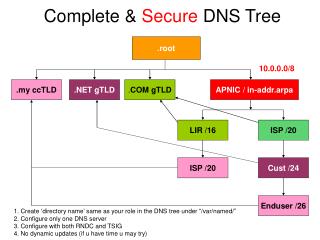
This guide provides step-by-step instructions for establishing a complete and secure DNS infrastructure. Focused on the 10.0.0.0/8 address space, it details how to create a directory name that aligns with your role in the DNS tree located under “/var/named/”. It emphasizes the need to configure a single DNS server, implement RNDC and TSIG for secure management, and restrict dynamic updates to enhance security. Ideal for network administrators looking to streamline their DNS setup.

Complete & Secure DNS Tree
E N D
Presentation Transcript
.root Complete & Secure DNS Tree 10.0.0.0/8 APNIC / in-addr.arpa .my ccTLD .NET gTLD .COM gTLD LIR /16 ISP /20 ISP /20 Cust /24 Enduser /26 1. Create ‘directory name’ same as your role in the DNS tree under “/var/named/” 2. Configure only one DNS server 3. Configure with both RNDC and TSIG 4. No dynamic updates (if u have time u may try)