Simplifying Keyword Search with Boolean Operators for Effective Research
Discover the power of keyword search using Boolean operators (AND, OR, NOT) to enhance your research capabilities. This method allows you to refine your searches by combining multiple keywords across various fields, such as Author, Subject, Title, and more. Learn how to enter search terms and choose logical connectors to tailor your queries for optimal results—whether you're searching for a specific author or exploring broader topics. Unlock efficient searching with our comprehensive guide!

Simplifying Keyword Search with Boolean Operators for Effective Research
E N D
Presentation Transcript
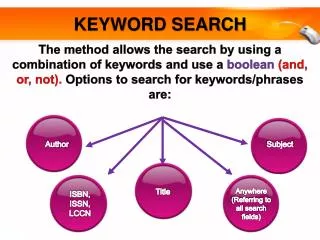
KEYWORD SEARCH The method allows the search by using a combination of keywords and use a boolean (and, or, not). Options to search for keywords/phrases are: Author Subject Title Anywhere (Referring to all search fields) ISBN, ISSN, LCCN
KEYWORD SEARCH Click here to begin
KEYWORD SEARCH USING “AND” 3 1 5 Type the term(s) to be searched in each text box labeled Word e.g (psychology AND Kalat, James W.). 2. Select one or more logical connectors, or operators, to combine your keywords. 3. Select Search Type e.g (Title AND Author) Select to the Location. 5. Click the Search button. 2 4
KEYWORD SEARCH USING “AND” Search Results
KEYWORD SEARCH USING “OR” 3 1 Type the term(s) to be searched in each text box labeled Word e.g (psychology OR attitude). 2. Select one or more logical connectors, or operators, to combine your keywords. 3. Select Search Type e.g (Title OR Title) Select to the Location. 5. Click the Search button. 5 2 4
KEYWORD SEARCH USING “OR” Search Results
KEYWORD SEARCH USING “NOT” 1 3 Type the term(s) to be searched in each text box labeled Word e.g (psychology NOT attitude). 2. Select one or more logical connectors, or operators, to combine your keywords. 3. Select Search Type e.g (Title NOT Title) Select to the Location. 5. Click the Search button. 5 2 4
KEYWORD SEARCH USING “NOT” Search Results